• Hey Guest👍👎 We're looking for reviews of your local CUPRA or SEAT Dealership - it's quick and easy to do: Leave a review now

Lancashire Lad

Active Member
Mar 6, 2011
409
31
Penwortham
www.seatcupra.net
Hi, I am at a loss with the auto wipers. I installed the sensor and auto switch for the lights. Auto lights, CH & LH all work. I have the rain option in the settings on the infotainment screen. I've gone through so many threads and gone back into odb11 to see if I've missed anything. Can anyone suggest anything?
 
The right-hand side column stalk has a position for auto wipers, one step up from it's default position and it stays there for the auto function to work. Not sure if the cars without rain sensor have the same stalk with the same positions. If it's different, you would have to replace it with the proper one. I'm probably wrong but this is the first thing that came to my mind. Maybe you already replaced it, or maybe it is the same in all cars regardless and doesn't need to be replaced.

Later edit: There are other things I'd like to ask about that might help, if we can get past the matter above.
 
Last edited:
Yes it has the intermittent setting on the wiper stalk.

What is the part number of rain/light sensor you installed? If you don't have it on hand, OBD11 can tell you in Control Units -> Central Electrics (09) -> Subsystems -> G397_xxxx -> Info -> Hardware number.
 
Sensor is 5Q0955547B
HEADLIGHT SWITCH BUTTON 5G0941431R
Car is 2016 prefacelift
 

Attachments

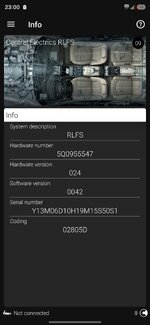
  • Screenshot_20261106_230055_OBDeleven.jpg
    Screenshot_20261106_230055_OBDeleven.jpg
    191.8 KB · Views: 37
Did you ever try long codings 06A8DD, 00A8DD or 06805D ?
I'd give those a shot if I were you.

Some people advised to have a soft reset after a change on that codings, if you have the following menu options in your infotainment:
-Car->Settings->Mirrors & Wipers->Automatic wiping->uncheck
-Factory settings->Reset individual settings->Mirrors & Wipers->reset
-and finally check that Automatic wiping back again.

And for testing, a couple of taps on the windscreen using your fingertips near the sensor area should trigger the auto-wipers.

Also, if you can get the copy of adaptations from your Central Electrics (09), I can take a look at it.
 
Did you ever try long codings 06A8DD, 00A8DD or 06805D ?
I'd give those a shot if I were you.

Some people advised to have a soft reset after a change on that codings, if you have the following menu options in your infotainment:
-Car->Settings->Mirrors & Wipers->Automatic wiping->uncheck
-Factory settings->Reset individual settings->Mirrors & Wipers->reset
-and finally check that Automatic wiping back again.

And for testing, a couple of taps on the windscreen using your fingertips near the sensor area should trigger the auto-wipers.

Also, if you can get the copy of adaptations from your Central Electrics (09), I can take a look at it.
long codings 06A8DD, 00A8DD or 06805D? I'm not sure what they are?
I'll try the reset again. How would I get a copy of the adaptions?
 
long codings 06A8DD, 00A8DD or 06805D? I'm not sure what they are?
I'll try the reset again. How would I get a copy of the adaptions?

Look at the screenshot of the sensor information screen you have attached to your reply to me. The six-character-text of numbers and letters on the last line is the long coding of the sensor. It holds some settings for the sensor to be able to work in your car and I suggest changing it to the values I provided, one by one, to see if that makes a difference.

That screen is just for information so you need to switch to the screen where you would make the change.

First of all, plug the OBD11 to the car and get it connected on the phone app.

Then turn on the ignition (not the engine)
and open the bonnet (this is required to be able to write the changes to the control unit, or you'll get a "conditions are not met" warning when you try to write).

Go to Control Units -> Central Electrics (09) -> Security Access and log in using the code suggested by the app there (probably 31347)

Go to Control Units -> Central Electrics (09) -> Subsystems -> RLFS -> Long Coding.

It will open up a screen where you can click on the 8 checkboxes, numbered between 0 and 7.

This is for byte 00 and there are two more bytes, 01 and 02. Each byte has their own 8 checkboxes and you can see those by tapping the arrows on the bottom back and forth.

The first long coding value I suggested is 06A8DD, each two characters in it represent the values of those bytes respectively: 06 for 00, A8 for 01 and DD for 02.

To be able to enter the changes, you need to know 8-bit binary representations of each two character, here I provide those:

06: 00000110
A8: 10101000
DD: 11011101

Each zero or one means a checkbox should be left unchecked (zero) or checked (one) in the related byte.

So, for the first byte, which is 00, you need to start checking/unchecking the boxes from bottom (7) to top (0) and according to binary value 06's binary representation 00000110, the boxes should look like this, from bottom to top:

7 Unchecked
6 Unchecked
5 Unchecked
4 Unchecked
3 Unchecked
2 Checked
1 Checked
0 Unchecked

As you're making these changes, you'll see the two characters for the byte 00 at the top will change accordingly, and if you correctly enter all 8, it should read 06 for byte 00.

Then you tap the right arrow, go to next byte and repeat the procedure for byte 01, and then for byte 02.

At the end, you need to tap and hold write button at the bottom. If you don't get any error messages, that means you have successfully changed the long coding for the rain/light sensor. Go to that Info screen back and make sure you see the code as 06A8DD.

Shut the bonnet down (or wipers won't work), turn off the ignition, turn it on again and check the auto-wiper function.

If this one does not work, you can try other two long codings using the same procedure. I can provide their binary representations when needed.

Good luck,
Serdar

 
Last edited:
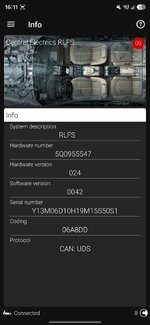
Hi have tried coding 06A8DD (see pic). I also did the reset, but still no auto wipers.
Also I noticed on the screenshot, there is now a line about protocol that wasn't there before.
The auto lights still work fine.
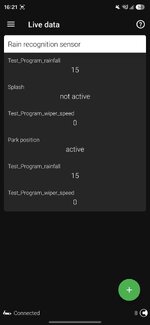
I also took a pic of live data for rain sensor, don't know if that's helpful.
 

Attachments

  • Screenshot_20261108_161139_OBDeleven.jpg
    Screenshot_20261108_161139_OBDeleven.jpg
    199.5 KB · Views: 37
  • Screenshot_20261108_162102_OBDeleven.jpg
    Screenshot_20261108_162102_OBDeleven.jpg
    92.3 KB · Views: 33
00A8DD

00: 00000000
A8: 10101000
DD: 11011101

As you may notice, only first byte is different. You can leave the next two bytes as they currently are.

06805D

06: 00000110
80: 10000000
5D: 01011101
 
  • Like
Reactions: Lancashire Lad
While there's no official list for what each bit or combination of bits control, there are people who said that the first byte is for highway light and rain light functions. It may not be related to the auto-wipers at all but this coding stuff is mostly a trial and error job, so give it a try if you ask me, you can go back to original anytime you want, as you said before.

Edit: as for the answer to your prefacelift question; these codes are from actual prefacelift cars that have the same sensor as yours and known to be original factory settings.
 
  • Like
Reactions: Lancashire Lad
00: 00000000
09: 00001001
5D: 01011101

In the meantime, you can send me a copy of your current long coding and adaptation values and I'll take a look and compare it to some other data I have on hand.

For this, go to Control Units -> Central Electrics (09) -> History -> tap Share button (envelope icon at the top right)

This will generate a log file with the current settings. The only option to get that generated file is to e-mail it, so you can send it to yourself, and then share it with me here on a post or a private message.
 
Last edited: