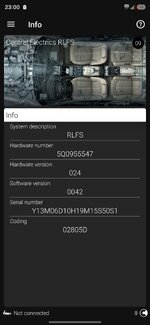
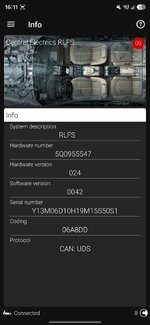
long codings 06A8DD, 00A8DD or 06805D? I'm not sure what they are?
I'll try the reset again. How would I get a copy of the adaptions?
Look at the screenshot of the sensor information screen you have attached to your reply to me. The six-character-text of numbers and letters on the last line is the long
coding of the sensor. It holds some settings for the sensor to be able to work in your car and I suggest changing it to the values I provided, one by one, to see if that makes a difference.
That screen is just for information so you need to switch to the screen where you would make the change.
First of all, plug the
OBD11 to the car and get it connected on the phone app.
Then turn on the ignition (not the engine)
and open the bonnet (this is required to be able to write the changes to the control unit, or you'll get a "conditions are not met" warning when you try to write).
Go to Control Units -> Central Electrics (09) -> Security Access and log in using the code suggested by the app there (probably 31347)
Go to Control Units -> Central Electrics (09) -> Subsystems -> RLFS -> Long
Coding.
It will open up a screen where you can click on the 8 checkboxes, numbered between 0 and 7.
This is for byte 00 and there are two more bytes, 01 and 02. Each byte has their own 8 checkboxes and you can see those by tapping the arrows on the bottom back and forth.
The first long
coding value I suggested is 06A8DD, each two characters in it represent the values of those bytes respectively: 06 for 00, A8 for 01 and DD for 02.
To be able to enter the changes, you need to know 8-bit binary representations of each two character, here I provide those:
06: 00000110
A8: 10101000
DD: 11011101
Each zero or one means a checkbox should be left unchecked (zero) or checked (one) in the related byte.
So, for the first byte, which is 00, you need to start checking/unchecking the boxes from bottom (7) to top (0) and according to binary value 06's binary representation 00000110, the boxes should look like this, from bottom to top:
7 Unchecked
6 Unchecked
5 Unchecked
4 Unchecked
3 Unchecked
2 Checked
1 Checked
0 Unchecked
As you're making these changes, you'll see the two characters for the byte 00 at the top will change accordingly, and if you correctly enter all 8, it should read 06 for byte 00.
Then you tap the right arrow, go to next byte and repeat the procedure for byte 01, and then for byte 02.
At the end, you need to tap and hold write button at the bottom. If you don't get any error messages, that means you have successfully changed the long
coding for the rain/light sensor. Go to that Info screen back and make sure you see the code as 06A8DD.
Shut the bonnet down (or wipers won't work), turn off the ignition, turn it on again and check the auto-wiper function.
If this one does not work, you can try other two long codings using the same procedure. I can provide their binary representations when needed.
Good luck,
Serdar