

• Hey Guest💡👉 We have just launched our new Dealer Directory and review service Find out more now

Ian G

Active Member
Apr 30, 2021
8
8
Hi all, this may be a stupid question but I just can’t find out how to end a phone call on my VZ3 the manual references a phone button on the steering wheel but that is replaced by a heating steering wheel button on the VZ3 … does anyone know how to end a phone call from the steering wheel (so I don’t have to tap the screen)
 
  • Like
Reactions: Napmasterflash
In my manual it’s page 90, it shows the phone symbol (but states depending on version) and on fig68 there is no phone button on the wheel …. that’s my predicament
 

Attachments

  • 28A961B7-A92E-4227-BE7A-667FF9C694CC.jpeg
    28A961B7-A92E-4227-BE7A-667FF9C694CC.jpeg
    460 KB · Views: 347
Hi all, this may be a stupid question but I just can’t find out how to end a phone call on my VZ3 the manual references a phone button on the steering wheel but that is replaced by a heating steering wheel button on the VZ3 … does anyone know how to end a phone call from the steering wheel (so I don’t have to tap the screen)
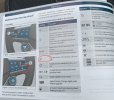
I remember the first call I took in the car.....couldn't figure out how to end the call!!!!

I wonder if the heated steering wheel button does it? Will check tomorrow
 
Does a call menu not appear in the centre of the digital dash? I would have thought you can use the right-hand scroll/click wheel to end the call.
 
  • Like
Reactions: Peyton
Does a call menu not appear in the centre of the digital dash? I would have thought you can use the right-hand scroll/click wheel to end the call.
I don't think so but wonder if you have your mobile set up in the digital dash (which I don't) it might do? Research project for tomorrow
 
I set up phone on digital dash but still
No luck with ending a call from the steering wheel
 
Sounds like it’s an oversight. Usually lower models would have a blank spot where the button might be, but to change the same button function between models is strange.
 
I thought that I can end the call by pressing the click wheel. I'll retest and report back.
 
You can’t. I tried that in my VZ2 today.

You can however use the click wheel to cancel a call or accept a call just not close one.


Sent from my iPhone using Tapatalk
It worked for me when I tried it last night (VZ Edition so I presume its the same layout), the red phone hang up symbol was showing in the centre of the right side graphic on the dash, and when I pressed the right 'click wheel', it ended the call.
 
It worked for me when I tried it last night (VZ Edition so I presume its the same layout), the red phone hang up symbol was showing in the centre of the right side graphic on the dash, and when I pressed the right 'click wheel', it ended the call.

I didn’t have the Red hang up phone symbol.


Sent from my iPhone using Tapatalk
 
It depends on whether you make a call from the connected Android Auto App or direct from the car phone directory, from android auto the scroll wheel on the right side of the steering wheel does nothing, from the car directory pressing the scroll wheel ends the call! Tried it a few times today on my VZ2 310
 
It depends on whether you make a call from the connected Android Auto App or direct from the car phone directory, from android auto the scroll wheel on the right side of the steering wheel does nothing, from the car directory pressing the scroll wheel ends the call! Tried it a few times today on my VZ2 310

I make calls via CarPlay App so that’s probably why I got no Red hang up phone symbol.


Sent from my iPhone using Tapatalk
 
So if the Formentors software is similar to my MK 4 Leon, which I think it is, then here is how to end the call when using Apple car play.
On the digital cockpit select the right hand section and scroll to the phone details view. When connected to CarPlay and no call is in progress this says CarPlay, when a call is in progress it tells you who yhe call is with.
now during the call press the button on the steering wheel that selects the right hand section of the digital cockpit and then press it a second time. This accesses a submenu of the phone section and shows either hang up or put on hold. These can be accessed with scroll wheel.
hope that makes sense
 
  • Like
Reactions: IanH72
