• Hey Guest💡👉 We have recently launched our new Dealer Directory and review service Find out more now

barry7377

Active Member
Feb 4, 2022
38
11
Hi all, I have a 2021 Leon FR and for about a month now, my rhs steering wheel controls have been giving me issues.

Generally nothing works except the wheel, it scrolls but doesn't push. Sometimes, I might get a few pushes of the other buttons before they fail.

I have experienced this once before but it healed itself and worked again within a week or two but this time it appears that it is gubbed.

Is anyone else experiencing this? Has anyone experienced it and sorted it? If so, what did you do to resolve it?

I see that someone else has had issues which remain despite having the buttons replaced several times so I'm interested in hearing the rough cost of the replacement if possible.

Cheers,

Barry

Sent from my Pixel 8 using Tapatalk
 
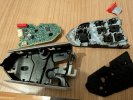
If you can't press the right wheel, it's a mechanical problem in the unit. Here in Austria the button unit costs 120€
 

Attachments

  • PXL_20241118_195624723.jpg
    PXL_20241118_195624723.jpg
    733.4 KB · Views: 188
  • Like
Reactions: barry7377
Thanks for that. Do you have a link for that at all?

Some of the buttons are working again. I can now operate the view and call buttons but still cannot push the wheel.

This is what happened before, they gradually came back to life.

Sent from my Pixel 8 using Tapatalk
 
Sorry, unfortunately no link. The prices are directly from my Seat dealer. In the meantime, at least outside the island, you can get steering wheels with buttons for 50€ where the buttons have nothing. Conversion takes less than 30 minutes
 
  • Like
Reactions: barry7377
Whilst I wait for the buttons to become me functional again, if they do, does anyone know how I could change the lhs display on the cockpit? I have it on range but would like to get it onto the temps.

Is there a way to do it via the infotainment system at all?

Sent from my Pixel 8 using Tapatalk
 
Sorry, unfortunately no link. The prices are directly from my Seat dealer. In the meantime, at least outside the island, you can get steering wheels with buttons for 50€ where the buttons have nothing. Conversion takes less than 30 minutes
Thanks for that. I'll have a word with my dealer too. That's quite refreshing that it's not overly expensive.

Sent from my Pixel 8 using Tapatalk
 
Whilst I wait for the buttons to become me functional again, if they do, does anyone know how I could change the lhs display on the cockpit? I have it on range but would like to get it onto the temps.

Is there a way to do it via the infotainment system at all?

Sent from my Pixel 8 using Tapatalk
Read the User Manual?
 
Do you have any update on this issue ? I am experiencing this occasionally for a long time. The last time i had this (only gear + button, other buttons were working) was 7 months ago. Now it happened again. But this time right handside steering wheel buttons were not working either.

I have seen several users who have this issue on german cupra forums. But no one could find a solution for this issue. I am pretty sure that there might be lots of people who are not aware of this issue as they don't oftenly use these buttons.

Does anyone know if there is any service bulletin on this issue?
 
I had a similar issue on my wife's manual 1.5 2019 Arona, where various steering wheel buttons randomly stopped working depending on the orientation of the steering wheel, then it would fix itself, and re-appear. Auto Electrician diagnosed it as a faulty clock spring.
 
I had a similar issue on my wife's manual 1.5 2019 Arona, where various steering wheel buttons randomly stopped working depending on the orientation of the steering wheel, then it would fix itself, and re-appear. Auto Electrician diagnosed it as a faulty clock spring.
It is nothing to do with the steering wheel orientation in our case. Service couldn’t detect a fault on clock spring either. But nevertheless, i bought a obdeleven device. i will do a detailed diagnose by my own. If clockspring or any component is faulty, i should see a fault code in the logs. And also i am sure that buttons are actually working. because when they are not responsive, i see ambient light flashes when button is pushed. this is the indicator that the button switch is functioning and the function is processed by clock spring. but i will check this with obdeleven too.
 
  • Like
Reactions: Goot
I just figured out what the root cause of the issue is! I am now pretty sure that it is triggered by the electromagnetic noise created by the button ambient light.

How i detected;
  • Issue was always occuring when the headlight on (and together with the interior ambient on as it automatically works together). As soon as the steering wheel ambient light is off, the issue disappears with no issue. But it was nothing to do with headlight. When i just turned the headlight off, the issue was still remaining.
  • Issue was intermittent. Sometimes it was never happening. But mostly it was occuring in the winter. (i will explain below why it is related to whether)
  • In the meantime, I performed multiple tests using OBD Eleven and discovered that the issue is related to the button ambient lighting. When I set the ambient light level to 60% or less in the infotainment menu, the problem disappeared and the buttons worked perfectly (confirmed via live data in OBD Eleven). However, whenever I increased the ambient light level above 60%, the issue reoccurred immediately. This indicates that the ambient lighting generates electromagnetic noise, which prevents the BCM from correctly recognizing the button signals.
  • Another reason why we see this issue; when we click the button, the ambient light level increases which is an indicator of that the button is clicked. While ambient light level increases, the noise level also increases which creates interference with button click signals.
  • It also slightly related to weather, because the electrical resistance of metals decreases with temperature, leading to an increased sensitivity to noise. That's why we may see this issue the most in the winter. At least it is valid in my case.
  • The issue might be partially related to the 12V battery level, as low voltage can make the electrical system more sensitive to electromagnetic noise. (My battery looks ok but this might a case for some of you. worth to check it)

Currently i don't know what i am going to do next to fix the issue. But an additional EMI shielding on the button cables to prevent from electromagnetic interference might be a solution. Or replacing button moduls might work (but this didn't work for one of my friends who had the exact same issue) .

I am open to your suggestions as well.
 
Last edited:
I just figured out what the root cause of the issue is! I am now pretty sure that it is triggered by the electromagnetic noise created by the button ambient light.

How i detected;
  • Issue was always occuring when the headlight on (and together with the interior ambient on as it automatically works together). As soon as the steering wheel ambient light is off, the issue disappears with no issue. But it was nothing to do with headlight. When i just turned the headlight off, the issue was still remaining.
  • Issue was intermittent. Sometimes it was never happening. But mostly it was occuring in the winter. (i will explain below why it is related to whether)
  • In the meantime, I performed multiple tests using OBD Eleven and discovered that the issue is related to the button ambient lighting. When I set the ambient light level to 60% or less in the infotainment menu, the problem disappeared and the buttons worked perfectly (confirmed via live data in OBD Eleven). However, whenever I increased the ambient light level above 60%, the issue reoccurred immediately. This indicates that the ambient lighting generates electromagnetic noise, which prevents the BCM from correctly recognizing the button signals.
  • Another reason why we see this issue; when we click the button, the ambient light level increases which is an indicator of that the button is clicked. While ambient light level increases, the noise level also increases which creates interference with button click signals.
  • It also slightly related to weather, because the electrical resistance of metals decreases with temperature, leading to an increased sensitivity to noise. That's why we may see this issue the most in the winter. At least it is valid in my case.
  • The issue might be partially related to the 12V battery level, as low voltage can make the electrical system more sensitive to electromagnetic noise. (My battery looks ok but this might a case for some of you. worth to check it)

Currently i don't know what i am going to do next to fix the issue. But an additional EMI shielding on the button cables to prevent from electromagnetic interference might be a solution. Or replacing button moduls might work (but this didn't work for one of my friends who had the exact same issue) .

I am open to your suggestions as well.
I'm experiencing the same problem with my Seat Leon Sports Tourer 1.5 FR. At night, the buttons don't work or work poorly. When there's plenty of daylight and the lights are off, the steering wheel buttons work perfectly. I've also read that the problem was with the light switch module.
 
I'm experiencing the same problem with my Seat Leon Sports Tourer 1.5 FR. At night, the buttons don't work or work poorly. When there's plenty of daylight and the lights are off, the steering wheel buttons work perfectly. I've also read that the problem was with the light switch module.
It is nothing to do with light switch module. Just try what i suggested. Just reduce the interior lighting level to %60 or less.(Click the car icon / go to interior lighting) It will immediately work perfectly. But In my case the threshold was %60. In your case it might be different. just give it a try.
 
It is nothing to do with light switch module. Just try what i suggested. Just reduce the interior lighting level to %60 or less.(Click the car icon / go to interior lighting) It will immediately work perfectly. But In my case the threshold was %60. In your case it might be different. just give it a try.
I just started the car and did what you said. At 100% brightness, the buttons don't work. At 95% brightness, they almost always work. At 90% brightness, the buttons always work.
 
  • Like
Reactions: stufan
I just started the car and did what you said. At 100% brightness, the buttons don't work. At 95% brightness, they almost always work. At 90% brightness, the buttons always work.
Perfect! I think you don't need to do anything else. %90 of brightness would be enough for even daytime use in summer.