

• Hey Guest👍👎 We're looking for reviews of your local CUPRA or SEAT Dealership - it's quick and easy to do: Leave a review now
Dec 21, 2025
4
0
Hi all, I have a CUPRA Terramar Business. According to the spec sheet it’s equipped with “Lane Assist Plus” and “Travel Assist”. Nevertheless, when I activate Travel Assist I don’t get automatic lane changes — whereas I thought that should be possible.

I also tried using the built-in CUPRA navigation, but still no auto lane change. I’m referring to the system commonly called “assisted lane change”, like in this video:
.

Is there a way to activate it (or a setting I’m missing)?

Thanks in advance.
 
Hi all, I have a CUPRA Terramar Business. According to the spec sheet it’s equipped with “Lane Assist Plus” and “Travel Assist”. Nevertheless, when I activate Travel Assist I don’t get automatic lane changes — whereas I thought that should be possible.

I also tried using the built-in CUPRA navigation, but still no auto lane change. I’m referring to the system commonly called “assisted lane change”, like in this video:
.

Is there a way to activate it (or a setting I’m missing)?

Thanks in advance.
A couple of months ago I had a test-drive with a Terramar from my local Cupra dealer. As far as I can remember, it had an "Assisted Lane Change" setting that can be turned on/off, under the Smart Assistants/Travel Assist menu. With this setting is turned on and Travel Assist is active, it should initiate when you use the turn signals.

If yours doesn't have that setting, the only explanation would be that the spec sheet was incorrect.
 
A couple of months ago I had a test-drive with a Terramar from my local Cupra dealer. As far as I can remember, it had an "Assisted Lane Change" setting that can be turned on/off, under the Smart Assistants/Travel Assist menu. With this setting is turned on and Travel Assist is active, it should initiate when you use the turn signals.

If yours doesn't have that setting, the only explanation would be that the spec sheet was incorrect.
Hmmm,

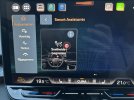
These are the only settings i got:
image.jpg
 

Attachments

  • image.jpg
    image.jpg
    703.3 KB · Views: 100
Hmmm,

These are the only settings i got

If I'm not mistaken, there should be a Travel Assist item along with what you already have in Smart Assistants.

Are you sure that you have Travel Assist function, like, you would have a capacitive steering wheel which is sensitive to your touch if you do ?
 
If I'm not mistaken, there should be a Travel Assist item along with what you already have in Smart Assistants.

Are you sure that you have Travel Assist function, like, you would have a capacitive steering wheel which is sensitive to your touch if you do ?
Well, when i touch the button on my steeringweel i see the option… so it is in the car…

But in the multimediasystem i cant see the option…
 

Attachments

  • image.jpg
    image.jpg
    299.3 KB · Views: 89
Well, when i touch the button on my steeringweel i see the option… so it is in the car…

But in the multimediasystem i cant see the option…

As I had seen in the configurator app, Cupra was offering driver assistance packages in three different sizes: M, L, XL. Assisted Lane Change feature was only available with XL, and L had Travel Assist without it. Maybe yours has only L, not XL. A lookup with your VIN *might* give us an idea about this, I say "might" because the feature descriptions in the PR list are not always very straightforward. If you can send me your VIN via a PM, I can take a look for you.

Cheers,
Serdar
 
As I had seen in the configurator app, Cupra was offering driver assistance packages in three different sizes: M, L, XL. Assisted Lane Change feature was only available with XL, and L had Travel Assist without it. Maybe yours has only L, not XL. A lookup with your VIN *might* give us an idea about this, I say "might" because the feature descriptions in the PR list are not always very straightforward. If you can send me your VIN via a PM, I can take a look for you.

Cheers,
Serdar
Thanks, that makes things clear.

Pretty sure this car got the L variant, not the XL.

Do you know if it is possible to update to XL throught the connected app? I haven’t got acces yet tot the app.
 
Thanks, that makes things clear.

Pretty sure this car got the L variant, not the XL.

Do you know if it is possible to update to XL throught the connected app? I haven’t got acces yet tot the app.

If Cupra was offering these features as dealer-activated software licenses aftersales, it would be so easy & wonderful. And I never understood why they don't. The only exception to this is the Full Link (Apple Carplay & Android Auto) activation licenses.

Anyway, a retrofitter who knows what they're doing could easily activate this for you, I believe. But it probably won't be cheap because of the SFD2 protection scheme in newer cars.
 
Last edited:
Well, when i touch the button on my steeringweel i see the option… so it is in the car…

But in the multimediasystem i cant see the option…
i got exactely the same, on the menu on the tablet the settings are limited to "Lane Assist" and there is nothing related to "Travel Assist" on any other page / menu, but when pressing the button on the steeringwheel i can activate the "Travel Assist" - by default it was selected ACC. I have tested briefly this morning - it keeps the middle of the lane, breaks if you turn on the signal and it detects an intersection ahead, it ask you to keep the hands on the steeringwheel, it turns the car if there is a curve ahead, etc. - i didn't knew this feature. Thanks!!
