

-
Guest, 🎅🎄Looking for a stocking filler idea? Why not treat yourself or a loved one to our high quality CUPRA or SEAT valve caps. Order now from the merchandise store
Can you add Speed Camera info to MY19 Nav System?
- Thread starter Kirky
- Start date
-
- Tags
- my19 navigation speed camera
You are using an out of date browser. It may not display this or other websites correctly.
You should upgrade or use an alternative browser.
You should upgrade or use an alternative browser.

In a nutshell Yes you can. There is a thread on the forum about how to do it and I use the method to add Speed Cameras into my Nav system on my 67 plate CUPRA 300.
I’m on my phone and can’t link the thread from here. @Tell can you point @Kirky in the right direction please?
Sent from my iPhone using Tapatalk
I’m on my phone and can’t link the thread from here. @Tell can you point @Kirky in the right direction please?
Sent from my iPhone using Tapatalk
Depends on what system you have.
If it’s one with WiFi function (for creating hotspot or playing media) then no.
POI’s won’t load on these units and Seat won’t fix it.
If it’s one with WiFi function (for creating hotspot or playing media) then no.
POI’s won’t load on these units and Seat won’t fix it.

I've not seen a hotspot option. I'll check later on.Depends on what system you have.
If it’s one with WiFi function (for creating hotspot or playing media) then no.
POI’s won’t load on these units and Seat won’t fix it.
In a nutshell Yes you can. There is a thread on the forum about how to do it and I use the method to add Speed Cameras into my Nav system on my 67 plate CUPRA 300.
I’m on my phone and can’t link the thread from here. @Tell can you point @Kirky in the right direction please?
Sent from my iPhone using Tapatalk
Found the thread thanks. Unfortunately as Slickric21 has pointed out the WIFI models don't work with the POI update. I have a model that has a part number that ends in 877 so looks like I can't load them 
Found the thread thanks. Unfortunately as Slickric21 has pointed out the WIFI models don't work with the POI update. I have a model that has a part number that ends in 877 so looks like I can't load them
Digital Dash part number ending 877?
Sent from my iPhone using Tapatalk
@Tell gave me the heads up on a Spanish Ateca thread where this problem is being discussed.
Reading between the lines using google translate the issue has been reported to Seat by several members but they have hit a brick wall and Seat don’t really care.
https://www.clubseatateca.com/threads/cargar-radares-en-los-nuevos-my19-navy-system.8455/page-22
Reading between the lines using google translate the issue has been reported to Seat by several members but they have hit a brick wall and Seat don’t really care.
https://www.clubseatateca.com/threads/cargar-radares-en-los-nuevos-my19-navy-system.8455/page-22
I speak Spanish and went through the same forum. You are correct. Last post was around 30th July and still no way to load POIs to the WIFI version of the Nav System. As you also said multiple people have reported the issue but SEAT aren't interested.@Tell gave me the heads up on a Spanish Ateca thread where this problem is being discussed.
Reading between the lines using google translate the issue has been reported to Seat by several members but they have hit a brick wall and Seat don’t really care.
https://www.clubseatateca.com/threads/cargar-radares-en-los-nuevos-my19-navy-system.8455/page-22
I think that's the MIB part number. Either way it's the part number that means I have a unit that can't have new POIs loaded.Digital Dash part number ending 877?
Sent from my iPhone using Tapatalk
I think that's the MIB part number. Either way it's the part number that means I have a unit that can't have new POIs loaded.
I could be wrong but I think that’s the same part number that @Damo H has in his CUPRA Carbon and he has the Speed Cameras on his.
@Damo H can you confirm if I’m right or wrong please.
Sent from my iPhone using Tapatalk

I don't have WiFi on my Sat Nav Sorry as mine is MY2018 car.
However I have uploaded POI's to @paddy6789 's car which has Wifi. But his is the Nav High, not the newer Wifi Enabled normal Nav units.
Looks like I'm stuck with Android Auto unless a fix is ever issued which does not look promising. I wonder if the MY20 cars have the same issue.
AFAIK the part number ending 877 is one of those units that can’t load poi’s.
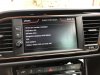
I’ve attached a screenshot of my unit that can’t load them.
Regarding the MY20 cars, I’m sure in that Spanish thread it was mentioned the issue doesn’t affect MY20 cars.
You can update the maps to the latest version though on these units, very easy to do so that’s one thing.
Don’t think a fix will be forthcoming for this issue as it’s just not a big deal for Seat.
I have wondered however, as the satnav comes loaded with 3 POIs that do work (petrol stations and 2 others I forget), can’t these be edited somehow on the sdcard and one of them replaced with the speed cameras poi ??
View attachment 9119
AFAIK the part number ending 877 is one of those units that can’t load poi’s.
I’ve attached a screenshot of my unit that can’t load them.
Regarding the MY20 cars, I’m sure in that Spanish thread it was mentioned the issue doesn’t affect MY20 cars.
You can update the maps to the latest version though on these units, very easy to do so that’s one thing.
Don’t think a fix will be forthcoming for this issue as it’s just not a big deal for Seat.
I have wondered however, as the satnav comes loaded with 3 POIs that do work (petrol stations and 2 others I forget), can’t these be edited somehow on the sdcard and one of them replaced with the speed cameras poi ??
I seem to have one of the units affected.
How are the maps updated on them?
Updating the POIs that come with new maps does seem like a possibility.
Random thought.
Could I use the built in Navigation which I quite like and use Android Auto with a camera detection app simultaneously, like TomTom speed camera app?
I use CarPlay and what you say is possible.
There is an app called Radarbot (similar to TomTom speed cameras) that you can run in the background and provide audible alerts to cameras.
However to be honest, I just use Waze now on the center screen.
It has everything, speed cameras and live traffic .. something the built in nav will never have.
Shame you can’t put the CarPlay/Android auto satnav on the center screen !!!
I know. This is what I wanted hahaI use CarPlay and what you say is possible.
There is an app called Radarbot (similar to TomTom speed cameras) that you can run in the background and provide audible alerts to cameras.
However to be honest, I just use Waze now on the center screen.
It has everything, speed cameras and live traffic .. something the built in nav will never have.
Shame you can’t put the CarPlay/Android auto satnav on the center screen !!!
Similar threads


- Replies
- 37
- Views
- 4K


- Replies
- 17
- Views
- 3K

- Replies
- 1
- Views
- 722

