• Hey Guest👍👎 We're looking for reviews of your local CUPRA or SEAT Dealership - it's quick and easy to do: Leave a review now

Fifer

Active Member
Mar 2, 2026
8
2
Hi everyone - I'm new to Seat, having picked up my new Leon 1.5Tsi SE Dynamic from the dealer on 2nd March. Took it from home (Fife) to the Lake District last week which was a perfect opportunity to get used to it.

I'm loving it so far, but have three minor issues/queries which hopefully someone can help with (I have RTFM!)

1. I can't get internet radio to work. It's enabled on the app and the globe symbol appears white on the centre screen, but after searching for a while all I get is "internet radio is unavailable, please check your network connection". I can use my phone via android auto, but I believe I should be able to use the car's eSim for infotainment?
2. How do I know my DRLs are working? The aren't on when the car is stationary with the parking brake on. I suspect the brake has to be off (and the car possibly moving?) So how can I check?
3. I understand there is meant to be some sort of "eco" dash indication when the car drops two cylinders under low power demand but 560 miles in, I've yet to see it. What should I be looking for?

Apologies for the random queries.
 
1.
IS the same for me.
But think we need to request an network subscription for this function. This because network usage is then higher.
I have chosen to use andriod auto and in it use the radio station i want.
2.
Drl are only on the front side.
Whit running engine. LED is on max brightness. When you have it on 1st setting citylight. Then it will go to 50% brightness, and on the reat as well two light will be on.
When you turn on main light in rear nothing wil change.on front main light wil be on.
3.
Unknnow about that, i think you should see it sooner on miles per gallon at that moment.
Mine is most time in hybride mode. Even unknown if i have this function on the engine actually
 
  • Like
Reactions: Fifer
I have set a routine in my phone that when it connects with Bluetooth to the car it automatically activates the mobile hotspot settings in the phone. Use the wifi settings in the car instead of the e-sim and the car will connect and have access to the internet.. im using the internet radio all the time this way
 
  • Like
Reactions: Fifer
3. I understand there is meant to be some sort of "eco" dash indication when the car drops two cylinders under low power demand but 560 miles in, I've yet to see it. What should I be looking for?

Set the display at the centre between the dials to "Consumption", where it shows the instant consumption. The two-cylinder mode will appear there when it's activated, in a small font under the bigger consumption numbers.
 
  • Like
Reactions: Fifer
Set the display at the centre between the dials to "Consumption", where it shows the instant consumption. The two-cylinder mode will appear there when it's activated, in a small font under the bigger consumption numbers.
Mine steps between long term, since refuelling and since start of journey. I don't appear to have an instant option unless I am missing something.
 
I have set a routine in my phone that when it connects with Bluetooth to the car it automatically activates the mobile hotspot settings in the phone. Use the wifi settings in the car instead of the e-sim and the car will connect and have access to the internet.. im using the internet radio all the time this way
Yes, that works for me but I was sure that for the first year (at least), I should be able to use the eSim for internet radio. Maybe I got that wrong.
 
2.
Drl are only on the front side.
Whit running engine. LED is on max brightness. When you have it on 1st setting citylight. Then it will go to 50% brightness, and on the reat as well two light will be on.
When you turn on main light in rear nothing wil change.on front main light wil be on.
I'm assuming you have a hybrid. I have no lights showing at the front with the engine on, the car stationary and the lights set to auto. I'm trying to determine if that's normal for a petrol, or a fault.
 
Mine steps between long term, since refuelling and since start of journey. I don't appear to have an instant option unless I am missing something.

Ok, that's because of Mk4 instrument panel difference probably. Check the options for left and right dial displays and see if there's an instant consumption option there.
 
  • Like
Reactions: Fifer
3. "2-cylinder": firstly you need to set the virtual cockpit to show the realtime consumption while driving, and while cruising with low loading (e.g. motorway driving, not accelerating) you may find the notification of 2-cyclinder mode in operation; but once you press the gas will immediately shift back to all-cylinder (normal) mode.
 
  • Like
Reactions: Fifer
3. "2-cylinder": firstly you need to set the virtual cockpit to show the realtime consumption while driving, and while cruising with low loading (e.g. motorway driving, not accelerating) you may find the notification of 2-cyclinder mode in operation; but once you press the gas will immediately shift back to all-cylinder (normal) mode.
I need to explore more. I can see three consumption modes - long term, since refuelling and since start of journey - but not realtime.
 
I need to explore more. I can see three consumption modes - long term, since refuelling and since start of journey - but not realtime.

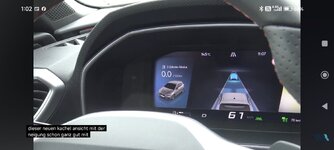
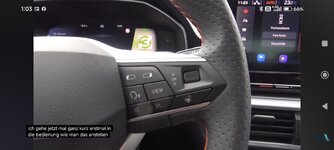
I got two screenshots from a video in German, which shows how to use the digital cockpit features in a Mk4 Leon.

In the first one, you can see the left-hand side of the display is in Consumption (Verbrauch in German) mode, and it also shows 2-cylinder mode on top. This is what you're looking for.

The view we're looking at in this screenshot is the one that has three separate rectangular areas. There are other views, such as circular tachometer & speedometer dials, semi-circular ones, or single dial of tachometer at the center, if your car has Sport view.

Regardless of which view was selected using the VIEW button on the right-hand side of the steering wheel (see the second screenshot), the left-hand side of the display will always show the selected information, which is the Consumption (instant, or real-time one) in this screenshot.

As for how to change this display option to show something else amongst the available options, you need to press top left button (again, see the second screenshot) first, and you'll see the left side of the display will be outlined to show that it is selected. Then you need to use the scroll button up or down to see available options (and find Consumption there).

Hope this helps & regards,
Serdar
 

Attachments

  • Screenshot_2026-03-22-01-02-10-016_com.google.android.youtube.jpg
    Screenshot_2026-03-22-01-02-10-016_com.google.android.youtube.jpg
    196.5 KB · Views: 30
  • Screenshot_2026-03-22-01-03-13-955_com.google.android.youtube.jpg
    Screenshot_2026-03-22-01-03-13-955_com.google.android.youtube.jpg
    200.9 KB · Views: 31
Last edited:
  • Like
Reactions: Fifer
Below is the screenshot of the owner's manual, check the highlighted text.
(You can toggle the fuel consumption unit between "mpg" and "L/100km" under the vehicle setup in the centre infotainment console)

1000031323.jpg
 
  • Like
Reactions: Fifer
I'm assuming you have a hybrid. I have no lights showing at the front with the engine on, the car stationary and the lights set to auto. I'm trying to determine if that's normal for a petrol, or a fault.
I have indeed hybride. But that does not change anything on DRL. This is in the EU mandetory.
When the light are set to auto or not does not matter.
When the engine runs there are 3options.
1.
Lights are off. Means DRL is at 100%, this is only at the front of the car
2.
Citylight. Means DRL goes to 50% brightness, this is then often the citylight function. And rear the citylights are on.
3.
Normal beam. Same as citylight. But now in the ftont headlight are on.


If you want to see it, let the engine run.
Turn of the lights and turn on blinker.
If you look at the front of the car often the blinker turns off the DRL on that side of the car.
No blinkers on, both DRL are on.
Switch to citylight mode and you see the brightness drop.
 
  • Like
Reactions: Fifer
As for how to change this display option to show something else amongst the available options, you need to press top left button (again, see the second screenshot) first, and you'll see the left side of the display will be outlined to show that it is selected. Then you need to use the scroll button up or down to see available options (and find Consumption there).

@Fifer Did you try this?
 
  • Like
Reactions: Fifer
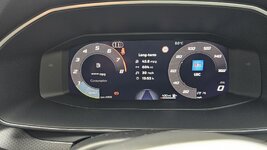
@Momochi and @serdar_18fr - Thanks - I hadn't realised that the < and > buttons opened up a whole lot of alternative display options and parameters. (Doh!)

I can now see what looks like realtime consumption in the centre of the rev counter (see photo). I'll look out for the two cylinder notification next time I'm out driving. Thanks!

20260323_173334.jpg
 
  • Like
Reactions: serdar_18fr
@Momochi and @serdar_18fr - Thanks - I hadn't realised that the < and > buttons opened up a whole lot of alternative display options and parameters. (Doh!)

I can now see what looks like realtime consumption in the centre of the rev counter (see photo). I'll look out for the two cylinder notification next time I'm out driving. Thanks!

View attachment 53350
Great!

The "realtime" consumption data is show inside the tachometer circle as shown in you pic, you will see the information while you drive along.

P.S. LBC.... you also a Londoner? Which dealer you will choose for the annual service?
 
  • Like
Reactions: Fifer
Great!

The "realtime" consumption data is show inside the tachometer circle as shown in you pic, you will see the information while you drive along.

P.S. LBC.... you also a Londoner? Which dealer you will choose for the annual service?
Couldn't be much further from London; I'm in Fife! I bought the car from Fife Seat in Kirkcaldy and have taken out a 3-year service pack with them.