• Hey Guest👍👎 We're looking for reviews of your local CUPRA or SEAT Dealership - it's quick and easy to do: Leave a review now

Momochi

Active Member
Jan 8, 2026
26
12
UK
Hi there,

I got a 75-reg (2025 made) Leon ST Mk4 and is a happy user of the Wireless Android Auto, able to make phone conversations, import phone contacts, using Google map navigation and listening to Spotify, etc.

But once in a while, say once every 10 times switching on the engine (i.e. at starts of my journeys, happens in both cold and warm engine starts), the Wireless Android Auto may get "stucked" and refuses to connect to Google map and Spotify, and the car also refuses to let me "delete" my mobile phone from the "My Link" settings.

I have to switch off the engine + leave and lock the car + walk away for ~5 metres + restarting my mobile phone + wait for 5 mins and retry the whole process, before it goes back to normal service.

The "exact" same issue also happened a few times when I rent a Golf Mk8.5 in October 2025 in Scotland. The console and the software/ UI was very much the same as my Leon.

I first thought it is something to do with my mobile phone (Xiaomi Poco F7 Ultra), but as both my Leon and the rented Golf refuse to let me delete the mobile device from "My Link" leads me to suspect the connection issue may be from the cars' consoles instead.

(I have not tried USB connection, as I cannot get it connected for data even with my USB 3.2 Gen2 cables for my SSD harddisks)

Any advice please? Thanks in advance.
 
It's an android auto/android mobile device compatability issue that will likely be resolved by a software update in the future.

I've had the same issue on a 25 and a 75 plate Tiguan using a Samsung S24 then S25.
 
It's an android auto/android mobile device compatability issue that will likely be resolved by a software update in the future.

I've had the same issue on a 25 and a 75 plate Tiguan using a Samsung S24 then S25.
Thanks James for your reply and advice. May I know if you experienced exactly the same issue with your two Tiguans? Or just the "disconnection" as described in the thread below?


I myself have never experienced any disconnection, only randomly not able to connect after getting into the car and preparing to start the journeys as mentioned in my original post. Except for once, cruising on the A12 on my way home, that the centre console suddenly "reset" itself by switching off completely for ~3 seconds, before restarting itself showing the SEAT logo. Scary....

Regarding the software update you mentioned - may I know if you might have further details to share? Just had an OTA update to one of the modules a few days ago, but could not remember what module it was. Unfortunately the same connection (stuck) issue still arised after that update.

Thanks again.
 
Hi there,

I got a 75-reg (2025 made) Leon ST Mk4 and is a happy user of the Wireless Android Auto, able to make phone conversations, import phone contacts, using Google map navigation and listening to Spotify, etc.

But once in a while, say once every 10 times switching on the engine (i.e. at starts of my journeys, happens in both cold and warm engine starts), the Wireless Android Auto may get "stucked" and refuses to connect to Google map and Spotify, and the car also refuses to let me "delete" my mobile phone from the "My Link" settings.

I have to switch off the engine + leave and lock the car + walk away for ~5 metres + restarting my mobile phone + wait for 5 mins and retry the whole process, before it goes back to normal service.

The "exact" same issue also happened a few times when I rent a Golf Mk8.5 in October 2025 in Scotland. The console and the software/ UI was very much the same as my Leon.

I first thought it is something to do with my mobile phone (Xiaomi Poco F7 Ultra), but as both my Leon and the rented Golf refuse to let me delete the mobile device from "My Link" leads me to suspect the connection issue may be from the cars' consoles instead.

(I have not tried USB connection, as I cannot get it connected for data even with my USB 3.2 Gen2 cables for my SSD harddisks)

Any advice please? Thanks in advance.
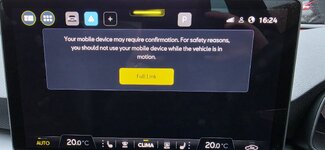
I have the exact same issue. I have a 75 reg Leon FR and for 2 months I didn't have an issue. But when I changed my mobile this week from a S23 to S26 and followed the instructions on adding a new phone, I've had the full link error at least once a day. And the only way it solves itself is by locking and walking away and letting the car connection end to my mobile etc. I've tried deleting my phone and it won't allow it either. I've uninstalled Android auto, cleared the cache, forgotten the Bluetooth connection on my phone and other things as well.
 

Attachments

  • 20260310_162454.jpg
    20260310_162454.jpg
    264.2 KB · Views: 26
I have also leon 2025, changed over to s26.
The time i did use it. It seems to be fine.
Still on 2650, the ones that are on 2798. Did you do this through ota update or through the dealer?
 
I have also leon 2025, changed over to s26.
The time i did use it. It seems to be fine.
Still on 2650, the ones that are on 2798. Did you do this through ota update or through the dealer?
Hi there. I am still on 2650.

Have you updated the Android Auto to 16.3.x for your S26? I updated mine (Poco F7 Ultra) from 16.2.x to 16.3.x earlier this week, and since then the connection problem has gone more frequent (2 to 3 times a day) ☹️☹️

I have also tried disabling the "wireless" option, forcing Android Auto connection via wired cable only, problem still petsists.

(No need to switch off the engine and get off the car if connection fails - keep pressing the on/off button of the central console for around 10 seconds, it will force the system to reboot, and will successfully connect again)
 
I had this issue with my Golf Mk8, turning off Wi-Fi scan throttling was the magic solution for me. You have to enable Developer options in Android first to see this option
 
I had this issue with my Golf Mk8, turning off Wi-Fi scan throttling was the magic solution for me. You have to enable Developer options in Android first to see this option
Same issue even after forcing "Wired only" connection in developer option menu.