

• Hey Guest👍👎 We're looking for reviews of your local CUPRA or SEAT Dealership - it's quick and easy to do: Leave a review now

Paul C

Active Member
Jul 11, 2026
12
4
When the clocks changed recently, I noticed that the clock in my 2018 Cupra CUPRA 300 TSI did not update automatically. On checking the manual and playing with the car’s menu options I found myself at the time and date settings.

As you can hopefully see from the picture, the “Clock time source” option states “No GPS reception”.

Well, the maps on the car work OK so to me the car has access to the GPS.
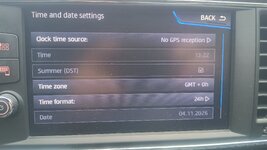

Cupra clock settings.jpg

Thoughts on what the issue is here?
 
Don’t know what the issue is but I always had to manually adjust the clock in the 5 VW’s I owned when the time moved back / forward in the autumn / springtime.
 
Mine worked/changed automatically. Also says GPS - where yours says 'no GPS'
 
You need to toggle the Summer/DST button.

The automatic / GPS is for timekeeping and maintaining accuracy.


Guy

Sent from my Galaxy S25 Ultra using Tapatalk
 
When the clocks changed recently, I noticed that the clock in my 2018 Cupra CUPRA 300 TSI did not update automatically. On checking the manual and playing with the car’s menu options I found myself at the time and date settings.

As you can hopefully see from the picture, the “Clock time source” option states “No GPS reception”.

Well, the maps on the car work OK so to me the car has access to the GPS.


View attachment 55823

Thoughts on what the issue is here?
I would suggest tapping on 'Clock Time Source' and seeing what options it shows, it may show 'GPS' option.
 
I think someone else reported the same issue a while back nut I do not recall if a solution was found. I would try changing the source to one of the other options. As I guess, I would expect them to be radio/RDS and manual. If the current time/date shown by the car is significantly off, try setting it manually then back to GPS.
 
  • Like
Reactions: nd-photo.nl
