

-
Guest, 🎅🎄Looking for a stocking filler idea? Why not treat yourself or a loved one to our high quality CUPRA or SEAT valve caps. Order now from the merchandise store
Software Update stuck?
- Thread starter dts0205
- Start date
You are using an out of date browser. It may not display this or other websites correctly.
You should upgrade or use an alternative browser.
You should upgrade or use an alternative browser.
I had the same thing, so I just exit the download and then when I looked at system info it had actually updated.Same here. Waited 10mins on the drive connected to WiFi and it didn't move. Drove off and switched the eSIM on.
30 minute drive to work and was in the exact same place as yours.
Got all excited, so hopefully it finishes!
Deleted member 123864
Guest

What version are you on now?
The update hasnt progressed any further and I'll been in the car with power on for 2 hours plus now. Current versions shown above so no idea if the update will change that (if it ever finishes)


Mine came up for a while saying please wait. Then the screen said no updates available. Which I thought meant it was finished, but no software numbers have changed.
Might be a bug that Dan mentioned in another thread that it doesn't change the numbers. Or more likely it just failed completely ??
Might be a bug that Dan mentioned in another thread that it doesn't change the numbers. Or more likely it just failed completely ??

Some of the updates are background updates which I would think would not change anything on the screen.
Sent from my iPhone using Tapatalk
Sent from my iPhone using Tapatalk
Deleted member 123864
Guest

Mine came up for a while saying please wait. Then the screen said no updates available. Which I thought meant it was finished, but no software numbers have changed.
Might be a bug that Dan mentioned in another thread that it doesn't change the numbers. Or more likely it just failed completely ??
The version number has never changed in mine since the day I picked it up (took a photo to remember
 )
)I know that I've had updates work as the store "app" was enabled at the end of last year which was mentioned in the unhelpful release notes of the update at the time
Mine always gets stuck at around 3/4 the length of the bar almost immediately after pressing the update button, I just ignore it turn the ignition off leave the car and lock it by the time I get in the car next (usually next morning) there's no mention of the update and as I said above it has done "something" so I assume it completed successfully
If it's still stuck the next morning then I would assume the update failed, and the page got stuck or wasn't aware the update failed, try rebooting the system(touch and hold the power button until you see the seat logo), the update could prevent the automatic everything off after 20 mins, I don't know for sure I'm basing this of my knowledge in other non-car related computer systems
With other cars I've had in the past after a failed update (which was every update with ford sync
) a trip to the dealer always verified the update installed correctly.I don't think the loader is actually showing progress more what step it is on, for example: (I don't know this is just my assumption)
1/4 - downloading update
2/4 - unpacking update
3/4 - installing update
4/4 - verifying update/done
It's a trick often done in software with progress bars
When I got in the car this morning there was another update (different release notes anyway), still got stuck at the 3/4 mark, just checked 4 hours later and it's still updating perhaps mines stuck now too
Same here... stuck 3/4 progress or failed and again reappeared ... and are more updates in fact but it shows them differently and both of them until now failed or stuck... so if it is happening with all of us in different parts of the world, same issue, sounds like a problem in Seat servers or something. Hope they get it fixed soon.
Will try to make an official complaint soon.
Will try to make an official complaint soon.
Deleted member 123864
Guest
Spoke to soon, and needless to say it’s stuck and eventually fails too!I’ve never noticed mine updating in the 2 months I’ve had it
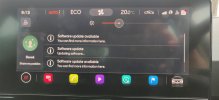
Mine have all cleared do not sure if they have completed (as no update complete message us ever given) or if they have just given up.
I’ll see if the infamous red dot that indicates an update appears when I drive home in the morning.
Sent from my iPhone using Tapatalk
I’ll see if the infamous red dot that indicates an update appears when I drive home in the morning.
Sent from my iPhone using Tapatalk
After three tries I've given up trying to install.
Two days later (and two spontaneous reboots of the infotainment while driving), this morning a message appeared that the software update was succesfull!
However the version number of the firmware stayed at 1664
Two days later (and two spontaneous reboots of the infotainment while driving), this morning a message appeared that the software update was succesfull!
However the version number of the firmware stayed at 1664
Similar threads

- Replies
- 10
- Views
- 2K


- Replies
- 1
- Views
- 745

