Jun 19, 2021
9
1
Hi everyone,
I'm from Turkey and I got a Leon FR in this week.As I understand it, Leon versions are named differently in each country. For example we have manual transmission, 1.5 TSI 130 hp, limited interior ambient light (only two color- red and white-) in FR and without navigation, full link and dashboard ambient light...

what i'm asking is;
Can i activate navigation, ambient light, full link with OBD or vagcom,etc..
Actually, I know that about is hardware. Maybe i'm wrong but I have an observation..There is tax problem in my country and maybe The topics I describe are limited by software. But İm not sure...

Do you think the problem is software or hardware?
 
That's probably getting up to 100% no. Mib3 if it's a Leon 4 unless your USB sockets are type A, type C that's Mib3. Mib3 connected services are the order of the day. Nobody I'm sure has too much knowledge of enabling navigation on that type of hardware if navigation is built in but not enabled. Ditto full link.

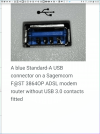
Type A USB would mean a mib2 has been put in, but I doubt it.
 
  • Like
Reactions: ygzaladag
Thnk u for your answer Tell..
But İm sorry I didn't quite understand what you said. Because I am not a professional in these matters. I don't know what mib3 or mib2 means :(
is it like software ? or like hardware system??

And whats the mean of USB type A or C?
if you are talking about USB type in console, its type C but i'm not sure you're talking about :((
Sorry my friend im bacis user :(
 
Mib2 is the previous infotainment system to 2020, to 2015 Mib1. Mib3 the latest online services, connected car.

Mib2 split into Mib2 standard and Mib2 high (plus). Standard maps are held on an SD card. High mapps are held on the built in SSD. Has a jukebox option where music files are held on spare space on the SSD. The connections used are USB-A. Rectangular connection in the dash - see diagram.

Mib3 all navigation maps held on an SSD. Updated by connected services over the air and offline via USB-C. That is an oval connection - see diagram.

The only question is whether they might have put mib2 on non European cars. Other than suspect it's all locked down what you can do. They might have put a lesser mib3 on export models to certain locations. The odd thing about mib2 exported to Israel is the units were fully functional but not supplied with an SD card. Gave advice to someone on getting card from Europe and putting the Rest of the World regional map on it.

Mib3 based cars are also effected by "SFD" on Obdeleven and VCDS coding so your options are contained on coding. There are certain things you can do. The infotainment unit is one locked down from user coding.

Mib3 is customised to Function Enablement Codes (FeCs) it's far to early for these to be mastered outside of Vag. So if you have a fully fledged mib3 then functions may well be turned off.

You could exchange with people here your hardware serial number and enabled FeCs. You get a list of supported and unsupported FeCs. You hang on the menu and a sub menu comes up. Again likely to be too early for people to know what they are but comparing the lists for specific hardware of available and installed is the scientific way of doing it. Hardware code, software code and available and supported FeCs... over to the Leon 4 community. Need pictures.

Screenshot_20210619-183541.pngScreenshot_20210619-183504.png
 
  • Like
Reactions: ygzaladag
Yes that's the real thing.

You then press the "menu" button until a screen that comes up than mentions FeCs. I got the local dealer to do it. He told me what he thought was the new menu button, I held for a few seconds, the mib2 trick, it worked, not that he knew what they were... he said so, had to do my teaching them ?.

I think you might press that bottom left button. You hold it for a few seconds, then you see a screen which mentions FeCs. Service menu. Photograph available and installed. Installed is what you have, uninstalled is what is possible but not activated. Need to photograph the system information screen that tells you model and software release.

Then you need someone who's done the same then compare FeC codes. It's like making a 4k TV but controlling people to watch SD or HD. The kit can all be the same.

Then you can Google and workout what you have.

Found the pictures I took. Get the idea. Someone who got a fully specified vehicle and compare with yours on the hardware code, software, installed FeCs and available but not installed.

20201009_162625.jpg
20201009_163004.jpg
20201009_163034.jpg
20201009_163020.jpg
20201009_163310.jpg
20201009_163303.jpg
 

Attachments

  • 20201009_163256.jpg
    20201009_163256.jpg
    349.1 KB · Views: 211
  • Like
Reactions: ygzaladag
Whilst you are all taking pictures of your FeC screen, hardware number, part number and software version and what features you have. That's the scientific method !.

What happens if you press the navigation button ?. If nothing I'm wondering whether they may be shipped set up but not populated with the map file. That would be if you had all the right FeCs for it. This is where you need to cross check a European model with yours looking at enabled FeCs and available.

You could try installing the offline navigation file for Turkey if it's just missing that. It won't damage it, just won't see it if it's not that. The file is listed here under Turkey.


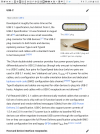
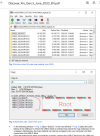
You put on a usb-c stick after preparation. Preparation is all important. Seat site doesn't have much on that. Same as VW Mib3 documention attached. File names will obviously be different. Copying them to the route of the USB is all important not one level down. A common mistake with the mib2 high. See diagram in the VW PDF.

Similar to mib2 high a pc is better than a Mac for this, use 7 zip to drag and drop the unzipped contents first to hard disk then the usb-c. If using a Mac then use Keka and CleanMydrive on the USB after.

You have to find the similar button to press on the menu to start it off as VW documentation. The Seat manual makes reference to that screen.

The Turkey map is quite small so if you do get the file preparation correct and find the install screen on your Seat it should be fairly quick. Note it only starts uploading to the unit with the engine running. Like mib2 high if you turn off the engine it will restart from where it gets too. Mib2 high takes upto 60 minutes on Europe. Guess Turkey within 15 minutes... I don't know the timing for mib3 on Europe. If file preparation is correct and it started just leave the USB in till completion turning the ignition off if required.

It won't damage the unit if it isn't suppose to import the map this way. One is testing whether your unit just needs the map installed on it. E.g.. the dealer hasn't done that due to license issues, same as Vags sold in Israel don't come with maps, they are fully prepared but just missing the maps. Might just need the map file presented to it and an up load triggered. As said rigours file preparation of the file has to be made else it won't recognise it. One character out in the download and it will fail import hence the need only to use 7zip on a PC or Mac Keka and CleanMydrive on the USB if using a Mac.

The installed FeCs if you had a decode to them ultimately tell you what is possible.
20210620_090053.png
 

Attachments

  • Discover_Media_MIB_Gen.2_June_2020_EN.pdf
    484.7 KB · Views: 456
What's wrong with a short answer rather than bamboozling the hell out of everyone?!
 
What's wrong with a short answer rather than bamboozling the hell out of everyone?!
If he wants to do it that's how or if you want to help by sharing your system information and enabled FeCs by photo. Any self respecting Seat driver should know about FeCs ?. They are the enabled functions. If not enabled it won't do it.

Navigation and Full link will be FeC codes... probably more than one. If we find he's got the same as everyone else, his unit will be specified all ready. May be the map just needs loading up off line as covered above. May be connected services aren't rolled out in Turkey.

Some of us like the scientific method of problem solving rather than the engineering method of breaking it first ?.
 
  • Like
Reactions: scuj1 and ygzaladag
Yes that's the real thing.

You then press the "menu" button until a screen that comes up than mentions FeCs. I got the local dealer to do it. He told me what he thought was the new menu button, I held for a few seconds, the mib2 trick, it worked, not that he knew what they were... he said so, had to do my teaching them ?.

I think you might press that bottom left button. You hold it for a few seconds, then you see a screen which mentions FeCs. Service menu. Photograph available and installed. Installed is what you have, uninstalled is what is possible but not activated. Need to photograph the system information screen that tells you model and software release.

Then you need someone who's done the same then compare FeC codes. It's like making a 4k TV but controlling people to watch SD or HD. The kit can all be the same.

Then you can Google and workout what you have.

Found the pictures I took. Get the idea. Someone who got a fully specified vehicle and compare with yours on the hardware code, software, installed FeCs and available but not installed.

View attachment 25445View attachment 25451View attachment 25443View attachment 25447View attachment 25449View attachment 25450
Hi Tell;
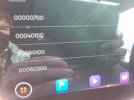
Firstly, I'm sorry for the late reply. Last night I compared codes with supported codes and you have two more codes (700 and 00060400).
I don't know what these codes mean and my installed codes screen is empty.
What do you think these codes mean? Could it be navigation?
 
Hi Tell;
Firstly, I'm sorry for the late reply. Last night I compared codes with supported codes and you have two more codes (700 and 00060400).
I don't know what these codes mean and my installed codes screen is empty.
What do you think these codes mean? Could it be navigation?
Well it's interesting since it is how you said nothing is installed if the installed screen is empty and the rest are available but not installed. You could try presenting it with that USB with the maps on it but then I dont reckon its set up to do anything. What I achieved last week by accident but corrected now in mib2.

Is this the official Seat Turkey line that connected services are not available. What about VW since the two companies are the same or Skoda. Perhaps those are populated over the air if you had connected services.
 
I'll try to upload maps tonight but firstly I need to find type-c to type-c cable :)
About connected services , I dont know. actually world icon is working in the top right but but seat doesn't offer us SeatConnect. i don't know what it does..
When I asked the official service, they say it's not possible install navigation but un-official service say it we can be loaded with special code and 400 euro for navigation...

I don't know. I'm very confused.
 
It shouldn't cost too much just try to see if it starts reading the maps as long as you present them as per the document and you are not using a Mac... saying that I would have expected a navigation FeC to be shown on the installed list unless it jumps into action. Unknown territory.
 
These are the same codes that are available on my first edition. The installed screen is blank as well. Could do with a friendly dealer to tell us what they are and how much $$$ to activate them.
20210630_164022.jpg
20210630_164007.jpg
 
These are the same codes that are available on my first edition. The installed screen is blank as well. Could do with a friendly dealer to tell us what they are and how much $$$ to activate them.
Are you missing functions as well ?. Are you UK based ?.

Blank installed FeC screen suggests you have nothing installed. Wonder whether if you dont subscribe to connect services or they aren't enabled will cause your FeCs to come off available. Fresh delivered UK on the road you would expect to show a good range of FeCs installed, not nothing which means not a lot of the functions will be working.
 
Installed on the one I sat in were:

00070a00
00070b00
00060300
00070500
00040100
00071c00

Looking at the supported list that covers the installed... so the installed are the key ones.... unless the firmware in yours doesn't show correctly the services.

Got these supported

00070900
00070a00 (again)
00070b00 "" ""
00070c00 "" ""

Had a few other codes but missed off top of text supported or installed
00000700
00040100
00060100
00060300

Fun.
 
Installed on the one I sat in were:

00070a00
00070b00
00060300
00070500
00040100
00071c00

Looking at the supported list that covers the installed... so the installed are the key ones.... unless the firmware in yours doesn't show correctly the services.

Got these supported

00070900
00070a00 (again)
00070b00 "" ""
00070c00 "" ""

Had a few other codes but missed off top of text supported or installed
00000700
00040100
00060100
00060300

Fun.
Best guess is that it is just a bug not showing the installed options on mine. As everything works just fine. Will have a check in the morning.