• Hey Guest👍👎 We're looking for reviews of your local CUPRA or SEAT Dealership - it's quick and easy to do: Leave a review now
oh thank you Chillout, I remove 02 00 (BeatsAudio) which I can enable via coding (adaptation)... thats pity that latest sw is not fully backward compatibile with old variants of car...
and what about skin, (red lines), is it possible to change it somehow without hard hacking (swapping names of skin folders or so on) instead of adjustment rgb profile https://www.drive2.com/l/550087042839610039/ ?
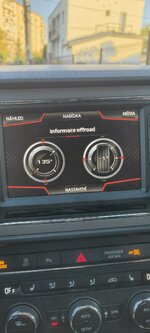
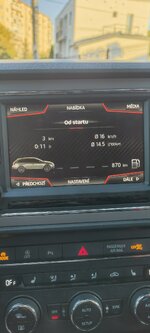
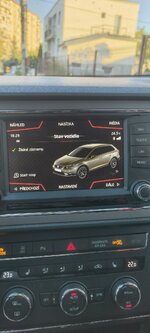
I dont have ambient lights in car, I just want to have in main unit same color of lines, as it is on maxidot (yellow). this is nothing customization, just using existing skin what I see on anothers cars (and also in my prev. sw, but on foto i documented that main unit has red color - strange, if it was switching automatically based on algorithm or what)...
You managed to change the red lines back to the original yellow ones. I have the same problem; after the MU1447 update, I have red lines. I have a 2016 Seat Leon X-Perience. The ambient lighting only has two colors: white and red.
 
Well the lines take on the ambient light colour so on the pallette of ambient colours on my Ateca Xcellence it has 16 or something so then one retrofitter moved me from the 2017 mib2 high release whatever that was to a later releases that's when it clicked into using the ambient pallette colour.

There is another 1447AIO thread where they started talking colours... you could eyeball that. Will post a link. You might find it in here:


I didnt move to 1447 just some FeC surgery with the github toolbox helped by board members a few years back. @Chillout is suppose (did) to have written the where with all for both mib2 high tool boxes. Might be the second one you need.... I haven't read this thread recently. Give you his project on screens.


Might be in there or elsewhere.... I've not done it.

The other one Mr Bonk etc M.I.B. used for the FeC editor. Think its that one his screen project that they used. The mib2 standard people use another project.
 
Last edited:
Čiary nadobúdajú farbu okolitého svetla, takže na palete okolitých farieb v mojom Ateca Xcellence ich má asi 16, takže potom ma jeden modernizátor presunul z vysokej verzie MIB2 z roku 2017 (nech už to bolo čokoľvek) na neskoršiu verziu, vtedy som si zvykol na používanie farieb okolitého svetla.

Existuje ešte jedna téma na 1447AIO, kde začali hovoriť o farbách... to si môžete pozrieť. Zverejním odkaz. Možno ho nájdete tu:

[URL rozbaliť="true"]https://www.seatcupra.net/forums/th...h-asi-carplay-android-auto-map-update.469828/[/URL]

Nepresťahoval som sa na 1447, len som trochu porobil FeC s nástrojmi z GitHubu, ktoré mi pred pár rokmi pomohli členovia predstavenstva. @Chillout pravdepodobne napísal (napísal) popis všetkých nástrojov pre oba high-tool boxy MIB2. Možno je to ten druhý, ktorý potrebuješ... Túto tému som v poslednej dobe nečítal. Ukážem ti screenshoty z jeho projektu.

[URL rozbaliť="true"]https://github.com/jilleb/mib2-toolbox[/URL]

Možno je tam alebo niekde inde... Neurobil som to.

Ten druhý, ktorý pán Bonk a podobne z MIB použili pre editor FeC. Myslím, že je to ten jeho projekt na obrazovke, ktorý použili. Ľudia pracujúci so štandardom MIB2 používajú iný projekt.


Do you think installing AIO will solve my problem? I found an image for the Leon X-Perience, but the skin isn't compatible with the X-Perience—the off-road menu isn't correct. Long coding doesn't work; I still get the same red lines.
 

Attachments

  • 58c6ae25-cb01-423b-8ac4-fd8624810b8e.jpg
    58c6ae25-cb01-423b-8ac4-fd8624810b8e.jpg
    109.1 KB · Views: 3
  • ca77ecc0-7d63-4bd6-a8aa-e0f6a4c12bc4.jpg
    ca77ecc0-7d63-4bd6-a8aa-e0f6a4c12bc4.jpg
    101.5 KB · Views: 4
  • df62ceda-82ab-40e9-9082-5708cffc74cc.jpg
    df62ceda-82ab-40e9-9082-5708cffc74cc.jpg
    115.6 KB · Views: 3
Last edited:
Do you think installing AIO will solve my problem? I found an image for the Leon X-Perience, but the skin isn't compatible with the X-Perience—the off-road menu isn't correct. Long coding doesn't work; I still get the same red lines.
The off road menu is enabled because AIO enables all of those hidden menus via the FeCs for them. That's something different.

Well Google AI points you in the direction of using the Jilleb toolbox as I said.

Screenshot_20260901_175433_Firefox.jpg
Screenshot_20260901_175444_Firefox.jpg


Then it links to the YouTube video.


I think that's how you do it but I have never used that toolbox myself.

The helpful AI summary came from this will probably render it in your language.