• Evo Magazine are looking for a mint and (and ideally unmodified) Leon Cupra Sub8 to drive and photograph for a feature. Find out more here .
  • Hey Guest👍👎 We're looking for reviews of your local CUPRA or SEAT Dealership - it's quick and easy to do: Leave a review now
Hi Giuseppe,
okay then you had the same original sensor as I installed.
It only works with the sensor 81A955555A !
All others do not work without error message.
If i leave it as it is, will i have any issues? except of fault?

Should i buy a new one (proper code)?

So this fault is from the sensor? right?

@astaller thank you
 
If i leave it as it is, will i have any issues? except of fault?

Should i buy a new one (proper code)?

So this fault is from the sensor? right?

@astaller thank you
I don't know if there are any other restrictions.
That's right, the error message comes from the sensor.
If you want then buy the sensor from Aliexpress.
 

Attachments

  • Settings.txt
    2.6 KB · Views: 466
  • Like
Reactions: Giuseppe Busso
@astaller

Thanks for the info mate, also for the codings!

I did a reset on the infotainment. I think that my issue with auto wipers has got fixed now.

So i'll keep with that sensor installed and sometime in the future i'll change it.

Thanks, i appreciate your help.
 
@astaller

Good morning. I have checked your attachment with the settings.

Yesterday, we checked another Seat Leon FR Model Year 2018 with the convenience pack installed from factory and i observed that there are some different settings according to your attachment.


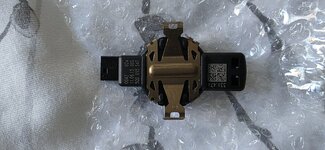
First of all it has the proper sensor (81A955555A) as you can see below:


The sunlight sensor is by default installed (same setting as in file)


But here you can see 4 different settings:


My friend's Leon has:

1) Terminal 15 instead of ENG122229-ENG117715-Car_Function_List_BAP_Gen2-wiper_comfort_0x0C_msg_bus -> Datenbus Komfort (comfort data bus)

2) 18lx instead of ENG141656-ENG116605-Außenlicht_uebergreifend-Helligkeitsschwelle Infrarot-Messung -> 0 lx

3) Not available instead of ENG141684-SFT271874-Slave_systems_identification-Sensor für Regen- und Lichterkennung -> verfügbar (available)

4) Hinweis_in_LDS-Stellung SL instead of ENG141656-ENG126818-Außenlicht_uebergreifend-Fahrlichtwarnung_Hinweis_Konfig -> Hinweis_in_LDS-Stellung_Null_und_SL


So?
 
Hi all,

I'm new here because I have searched hi and low to find an answer to this.
Does anybody know what the bytes mean in the light/rain sensor ? In the first post they are speaking about 00095D. My car has 0018DD.
In some other thread I found (vcds), someone said :

Capture.PNG


Is this true ? Can someone confirm this ?

Regards,
Jacco
 
@astaller

Good morning. I have checked your attachment with the settings.

Yesterday, we checked another Seat Leon FR Model Year 2018 with the convenience pack installed from factory and i observed that there are some different settings according to your attachment.


First of all it has the proper sensor (81A955555A) as you can see below:


The sunlight sensor is by default installed (same setting as in file)


But here you can see 4 different settings:


My friend's Leon has:

1) Terminal 15 instead of ENG122229-ENG117715-Car_Function_List_BAP_Gen2-wiper_comfort_0x0C_msg_bus -> Datenbus Komfort (comfort data bus)

2) 18lx instead of ENG141656-ENG116605-Außenlicht_uebergreifend-Helligkeitsschwelle Infrarot-Messung -> 0 lx

3) Not available instead of ENG141684-SFT271874-Slave_systems_identification-Sensor für Regen- und Lichterkennung -> verfügbar (available)

4) Hinweis_in_LDS-Stellung SL instead of ENG141656-ENG126818-Außenlicht_uebergreifend-Fahrlichtwarnung_Hinweis_Konfig -> Hinweis_in_LDS-Stellung_Null_und_SL


So?

Hi Guiseppe,

please excuse me for being so late, did not get the message.
Yes, that's how everything should work.
 
Hi can anyone confirm what sensor I would need for a 67plate Leon as don’t want to order multiple ones ??
 
Hi, I installed the rain sensor as described, the automatic wipers worked for a while and then stopped working. Can you help me ? thank you
 
Hello, I have one question. I have a 2017 facelift Leon fr and just changed the sensor with 81A955555A, did all the steps but from the drop down coding page, it showing me the old sensor. I did a long coding (00885D) to it. It works but the naming remains. Is it normal or does it have to recognize the new sensor name?
47664c8d36bb1ac72f3144a2e915d3dc.jpg
 
Hello, I have one question. I have a 2017 facelift Leon fr and just changed the sensor with 81A955555A, did all the steps but from the drop down coding page, it showing me the old sensor. I did a long coding (00885D) to it. It works but the naming remains. Is it normal or does it have to recognize the new sensor name?
47664c8d36bb1ac72f3144a2e915d3dc.jpg
Just checked the soft reset when reselecting LIN_REGEN_LICHT_SENSOR and my sensor appeared as it should at the coding page.
 
No fault now at the scan process? I have to do the same. Leon FR mk3.5 here too.
I have the 81A955555A sensor. For now everything works and i don't have any faults stored yet.


Edit: i also changed the coming home to automatic from Car Scanner pro, but how do I add this option on my mib2 screen?
 
Last edited:
I have the 81A955555A sensor. For now everything works and i don't have any faults stored yet.


Edit: i also changed the coming home to automatic from Car Scanner pro, but how do I add this option on my mib2 screen?
I don't believe that you can add this option. Have you chosen to enable it via driver's door?
 
I don't believe that you can add this option. Have you chosen to enable it via driver's door?
Yes I've enabled it via driver's door. I can choose the seconds or off for each coming or living as before but at my parking there is no good lighting and my headlights turn on every time i take the car, so i would like to have the option to have the coming leaving home manually and enable or disable the automatic but nevermind, i'm asking too much. I'll disable the automatic come/leave home and switch my lights on when needed.
 
  • Like
Reactions: Giuseppe Busso
I know this is an old thread, but the images on pg3 no longer show. I've bought the sensor and switch to get auto wipers and lights. My car is a 2016 (pre face lift).
I have odb11, so if anyone can point me to a guide to code it, that would be great.
 
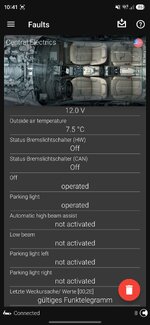
Hi, installed the switch and the sensor earlier. I have not done any coding yet, but when I turn the switch to auto I get a lighting error on the dash and when I scanned I got the fault below. Will these go when I do the coding?
1000045500.jpg
 

Attachments

  • Screenshot_20261018_104137_OBDeleven.jpg
    Screenshot_20261018_104137_OBDeleven.jpg
    240.9 KB · Views: 32
  • 20261018_100304.jpg
    20261018_100304.jpg
    572.9 KB · Views: 28
  • 20261018_100254.jpg
    20261018_100254.jpg
    469.9 KB · Views: 29
OBDeleven Rain/Light Sensor Coding Mk3 FR Guide.

I have just got this working using OBDeleven PRO so I thought I would post how I did it for anyone else with little or no experience of the program. The steps are similar to VCDS but I couldn't find out where you code the sensor with "00095D" so I just left that part out and it still works!

Firstly a big thank you to Deathjam, an amateur like myself wouldn't of been able to do this without you taking the time to put together your guide.

Please be aware I am a rank amateur at this, I took a chance armed with the VCDS guide on this thread and it worked for me, follow this guide with my settings at your own risk. You will also need the PRO version of OBDeleven to do this

I have no errors showing and both rain/light sensors are working as well as coming/leaving home functions.

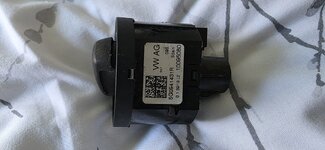
I have a 2013 FR and the parts numbers I used are 5Q0955547B for the sensor and 5G0941431AF-WZU for the switch which has the correct colour lighting, only difference being the small amount of silver trim is brushed aluminium rather than the chrome on my original switch.

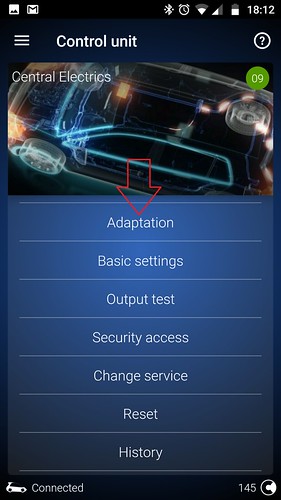
To start with swap the sensor and switch as described in the other instructions, fire up OBD11 and go into control unit 09 Central electrics.
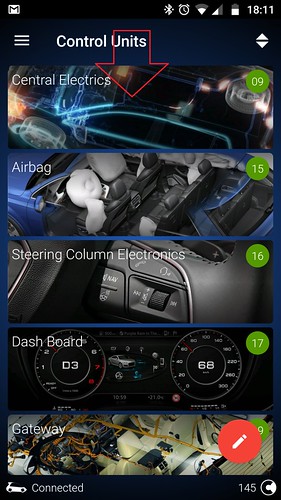


Select Long Coding
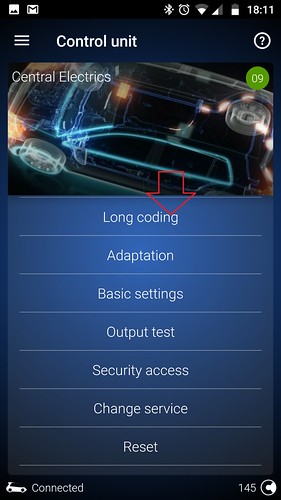


Select this symbol to move from the textual long coding into the standed format.
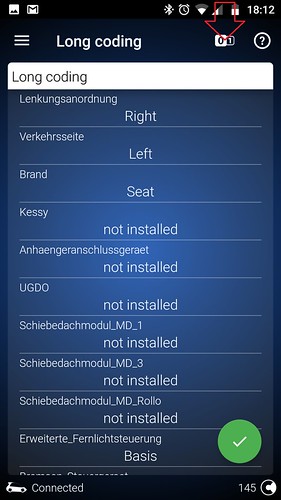


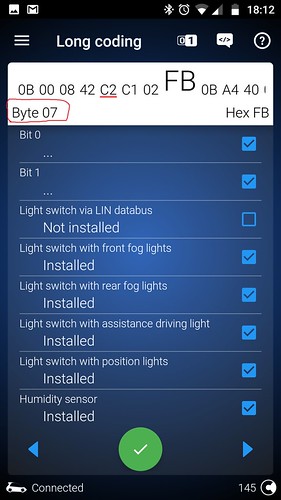
The screen will now look like this, notice the byte 00 in the top left hand corner. Press the arrow in bottom right to move to byte 06.
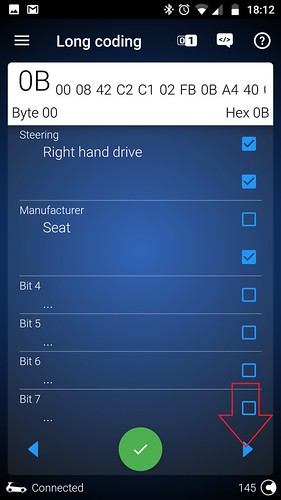


When there select the tick box indicated (bit 01) and hold the green tick to save the settings.
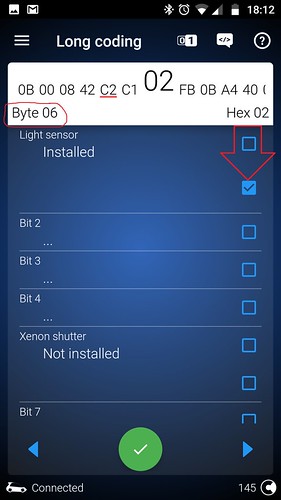


Arrow once to the right (byte 07) and make sure the screen looks the same as mine with bit 0,1,3,4,5,6,7, all selected, hold the green tick to save the settings.


Now go back to the control units menu and select "Adaptation"

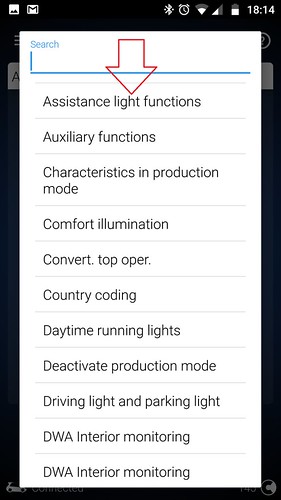
Select Assistance light functions.


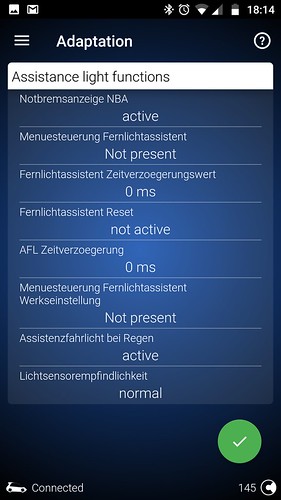
Make your adaptations the same as mine. I noticed at this point that I had less available adaptations than in Deathjam's guide but I just made the ones I did have the same so don't panic if you have more adaptations just fill them in as in his guide further up the thread, hold the green tick to save the settings.


Back to Adaptations menu and select "Comfort illumination".
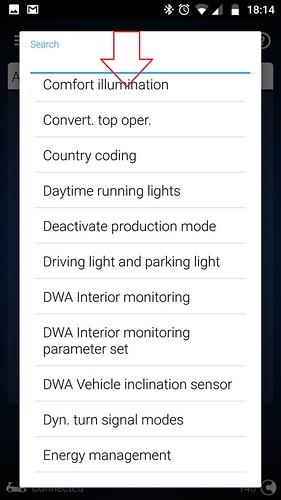


And again make sure you adaptations match mine, hold the green tick to save the settings.
The last thing that threw me a bit was the 2 settings below, you will notice they have different values to mine. It wasn't possible for me to enter those values in OBD11 so after a bit of searching the internet I found that the values I have used (2 and 116) were the correct ones.

(6)-Comfort illumination-Helligkeitsschwelle Infrarot-Messung 18 lx
(10)-Comfort illumination-Helligkeitsschwelle Forward-Messung 46400 lx
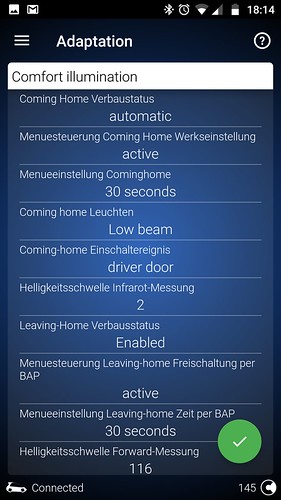


Disconnect from the car and turn the ignition off, you may have to go into car setup to enable the coming/leaving home functions.

That is it, hopefully everything is now working for you?

Hi, I know this is a really old guide, but I'm trying to code my sensor properly for my prefacelift. As I can't see the pics I am unsure what I should see. I have tried other guides but I'm confused with the bytes stuff.