2023 I subsequently checked. Same generic map update files so I call it mib3... I might need to change the title and clarify. That would be better. Thanks.

All the same map on the Seat / Cupra site for these yet old...we can do better. Born included with the rest. Tavascan isn't listed or the Terramar hmm... probably because they haven't updated the webpage both the text and links :eek: .


As of March 2026 these are currently the generic offline map update files for mib3 / 4:


Post your success pictures 📸.
 
Last edited:
Hello 👋🏻 , my mib3 software at 1985 i ahave an issue when i do reverse the image of backup camera stay on it won't change by it self and sometimes Android auto won't connect at all unless doing hard reset, anyone can help with 1990 update software files i don't have OTA update thanks everyone
 
The thread is on map updates not software (firmware) updates. OTA and dealer firmware updates are the only legitimate ones. Recently found firmware is a naughty word so posts with it in get put on premod although mine don't... I think 🤔 . Updating firmware yourself can be a dangerous activity. I believe the firmware in anycase is linked to region on mib3/4 so if you get the wrong region in it, it's no good. I know this by looking at tables. If you do find a website watch that one.

On your other issues suggest you post on the appropriate thread, backup camera, make one. You might find someone who can help you on that other subject on a PM.
 
Last edited:
  • Like
Reactions: steveyoshi
Yeah, but I'm not sure whether VAG developers thought about a case like this and handled it properly in the code:

There's an already-started but not-completed-yet update process (We even don't know that, maybe it didn't like the update contents and it isn't doing anything other than checking the flash disk), now we're giving it another version.

What's it gonna do? Rollback the first one and start fresh with the new one? Or do nothing and tell the user nothing about it?

Nobody knows for sure.

Latest on map update attempt:

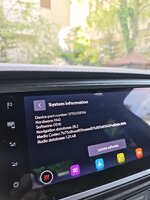
I had stopped trying to update to 25.6 before. Today reformatted the USB stick, copied 26.2 (latest available) files, put it on a USB-C port in the car, waited half an hour, restarted the infotainment, checked the system info and it was there.

I believe very little, if not nothing, has changed, hence the quick completion.
 

Attachments

  • MVIMG_20260502_100948.jpg
    MVIMG_20260502_100948.jpg
    472.4 KB · Views: 98
  • Like
Reactions: Tell
Glad it's sorted. Seem to be some stories where they get stuck on one release won't move forward. Over the air ones it seems to be said put the downloaded one in and it fixes itself. Don't think yours fell into that category. Not over the air. The update is suppose to update the map fragments that have changed. A mute point is how long you leave it in for that operation and if there is a glitch it won't work. Hence where it's said use the release that tallies with the current over the air or move forwards. It's a black box.
 
  • Like
Reactions: serdar_18fr
Is that because these units aren't prepped for online services or your took it off to get the update. Is that standard Obdeleven type of coding or some weird backend weird way of doing it or just stuck for whatever reason and you force an offline update by toggling off online services - that you don't normally have to do.

If coding what are the key words one is looking for, for off and on ?. Again suspect its on units between 2020-???. Where SFD 1 applies and after SFD2 with some workaround. I thought 5f was locked down.... could be the "on the bench thing".

Your standard ones can be updated via the map file its the more tricky ones where they didn't intend to activate the maps for those geographical areas, Turkey, Middle East and Africa ? Where some tricks come in. Where we say the use a retrofitter or is this where its an export car with connect services (second hand) that's then re purposed but you'd have to change the navigation FeCs as well. Fun.
 
Each of these devices had an online connection. If you want to use the devices at your desk, the online function must be deactivated. Otherwise, it will get stuck in an endless loop during user login. No patch is needed, just a simple code change. I recommend deactivating it to anyone who doesn't use online services... the system then runs incredibly stable and fast.

Offline Map Update works every time, EU Car
 
Last edited:
  • Like
Reactions: Tell
SFD 2 locks the coding, but not all adaptations... an SFD 2 device has both SFD 2 and SFD 1. Adaptations not locked by SFD 2 can be changed after unlocking SFD 1. For SFD 2 vehicles, the diagnostic firewall must always be unlocked in the gateway.
 
  • Like
Reactions: Tell
@Tell

Seat MOI3 MQB Classic in Octavia 3 with OCU 3 High MQB Classic.

Only for Testing some thinks in my Holiday Trip
 

Attachments

  • Screenshot_20260618-124600.png
    Screenshot_20260618-124600.png
    315.6 KB · Views: 16