yes something like that he may need to copy the gracenote files to the folder on the sd card he is using also i experienced this before.I'd try 1447AIO again in case you took the wrong turning. I don't think Grace notes is important.
If that fail try 1447 plain. Then the mib2 high Mr Bonk over it.
The backend menu, swdl will allow you to over install previews firmware on mib2 high. The normal front menu won't. You have to play with the button presses to select ALL. Always tricky to explain how that works. A long hold on the menu button on the second opening of the menu (if the developers menu enabled which I think 1447aio does or do via a coding device) takes you to the SWDL menu. Then you dance your fingers around that to download all... which means load all which is taken as a complete overwrite.


-
Evo Magazine are looking for a mint and (and ideally unmodified) Leon Cupra Sub8 to drive and photograph for a feature. Find out more here .
-
Hey Guest👍👎 We're looking for reviews of your local CUPRA or SEAT Dealership - it's quick and easy to do: Leave a review now
MIB2/MHI2 Harman High - MHI2_ER_SEG11_P4709_1_MU1447 - AIO FW update & ifs-root Patch (ASI, CarPlay, Android Auto, Map Update)
- Thread starter MIB-Wiki
- Start date
You are using an out of date browser. It may not display this or other websites correctly.
You should upgrade or use an alternative browser.
You should upgrade or use an alternative browser.

You'd have to make sure the metacheck added up if you started to modify the 1447aio software. Whilst the encryption sla signature is avoided. The check sums must still work out.yes something like that he may need to copy the gracenote files to the folder on the sd card he is using also i experienced this before.
Its not editing the script the gracenote folder has nothing in it from memory, i had to put the database in there and run the update again for it to finish the update properly and not skip anything.You'd have to make sure the metacheck added up if you started to modify the 1447aio software. Whilst the encryption sla signature is avoided. The check sums must still work out.
I found the toolbox for the high version quite buggy to use had to use more than one version to make things work. The std mib2 is a breeze
Right. I don't think it's a big loss if it works without Gracenotes. Gracenotes is just cover art that you can load yourself.
Yes you can actually just skip gracenote but it sounds like the patch has changed something else like a varient or region or something. I had strange results if LTE was disabled for some unknown reason.Right. I don't think it's a big loss if it works without Gracenotes. Gracenotes is just cover art that you can load yourself.
Also check branding is still set as seat
Last edited:

I no longer have a mib2 high unit to check. But as i said you need to go back into the toolbox and check some settings for varient etc.It seems like you’re much more familiar with the topic than I am. Could you please walk me through step by step what I need to do to get my navigation system working again? Thank you very much.
Navigation stuck on initialising 11% after Carplay activation. · Mr-MIBonk M.I.B._More-Incredible-Bash · Discussion #523
I have no idea what has caused this as I have done this procedure before with success... I tried to update maps to the newest version to see if it would budge but I just get NavDB_Check timeout. Am...
 github.com
Maybe serach the error it would have happend to someone else.
I don't think he's used the tool box yet. I suggest via swdl install a non modded version of the firmware then mod it with the toolbox. It's the modded version of 1447AIO that has failed. Probably someone has loaded up a poor version onto mibsolution.one where there was one that was fine before. That's what I suspect happened. Swdl on the mib2 high will allow you to re install firmware whilst the normal front screen won't.I no longer have a mib2 high unit to check. But as i said you need to go back into the toolbox and check some settings for varient etc.

Navigation stuck on initialising 11% after Carplay activation. · Mr-MIBonk M.I.B._More-Incredible-Bash · Discussion #523
I have no idea what has caused this as I have done this procedure before with success... I tried to update maps to the newest version to see if it would budge but I just get NavDB_Check timeout. Am...
Maybe serach the error it would have happend to someone else.
I believe that map memory will be empty after 1447AIO so you have to load up the maps. N/A may just be saying the memory map store is empty. That's where I load the maps in via swdl with the door open to keep the power on. It will moan fairly quickly if it's not taking the maps. That's worth checking if that hasn't been done. Assuming the maps are presented correctly. 7zip unzipped, no mac involved etc.
Failing that try an unmodded version of the firmware and the mib2 high Mr bonk toolkit. 1447 original. Unfortunately I think the mib2 high firmware experts have flown. I use swdl on the map updates since I like to see the maps being read in and progress. But that back end tool covers all aspects of how the mib2 high units assorted memory areas are accessed for updates. The hackers have bypassed the signature protection which is how 1447aio was constructed which is fine if they got it right. But will trip out if they haven't. Mr bonk toolkit is the alternative to mod the unit from an original firmware.
I do have a link when I used the tool which gets a bit heady.
Bones of using mib2 tool is here:
SW update for MIB2 infotainment system?
Working towards it... more of a cloudy day tomorrow so good for sitting in the car on it ;). It was Chillout's bragging on Drive and Jose on the Spanish board that alerted me to the 192 solution. Jose says MIB Tools wasn't used. Used a retro-fitter. Taking the DIY route but @jpmedia has offered...
 www.seatcupra.net
Basically it's menu driven from the green menu. It's preset up with all the FeCs you need but you can add extra if required. It's one of these things you only use once and when it works. Job done.
I thought the aio version was for hacked units only ? He should have just used the official one in that case. I assumed the unit was a retrofit.I don't think he's used the tool box yet. I suggest via swdl install a non modded version of the firmware then mod it with the toolbox. It's the modded version of 1447AIO that has failed. Probably someone has loaded up a poor version onto mibsolution.one where there was one that was fine before. That's what I suspect happened. Swdl on the mib2 high will allow you to re install firmware whilst the normal front screen won't.
I believe that map memory will be empty after 1447AIO so you have to load up the maps. N/A may just be saying the memory map store is empty. That's where I load the maps in via swdl with the door open to keep the power on. It will moan fairly quickly if it's not taking the maps. That's worth checking if that hasn't been done. Assuming the maps are presented correctly. 7zip unzipped, no mac involved etc.
Failing that try an unmodded version of the firmware and the mib2 high Mr bonk toolkit. 1447 original. Unfortunately I think the mib2 high firmware experts have flown. I use swdl on the map updates since I like to see the maps being read in and progress. But that back end tool covers all aspects of how the mib2 high units assorted memory areas are accessed for updates. The hackers have bypassed the signature protection which is how 1447aio was constructed which is fine if they got it right. But will trip out if they haven't. Mr bonk toolkit is the alternative to mod the unit from an original firmware.
I do have a link when I used the tool which gets a bit heady.
Bones of using mib2 tool is here:
SW update for MIB2 infotainment system?
Working towards it... more of a cloudy day tomorrow so good for sitting in the car on it ;). It was Chillout's bragging on Drive and Jose on the Spanish board that alerted me to the 192 solution. Jose says MIB Tools wasn't used. Used a retro-fitter. Taking the DIY route but @jpmedia has offered...
Basically it's menu driven from the green menu. It's preset up with all the FeCs you need but you can add extra if required. It's one of these things you only use once and when it works. Job done.
No it works on any Seat mib2 high unit. The people behind it took the final 1447 firmware then using the method to evade the firmware signature check modified the firmware to add all all the FeCs you'd ever need. Update Gracenotes beyond the final release on the official firmware.I thought the aio version was for hacked units only ? He should have just used the official one in that case. I assumed the unit was a retrofit.
There have been good experiences on quite old mib2 highs. It does not suffer from the train issue of jumping trains as the mib2 standard. It might delete the map memory in the process. I seem to recall that people had to reload the maps. Normally on firmware updates you don't.
The original 1447 firmware had some teething problem when installed you had to change the screen to "copper" before installation else it came up blank. Then you recoded that to get it to show. But better change that before you started to that Cupra boy racer diamond background.
The German Digital Eliteboard had threads on the original 1447 firmware and this issue. So 1447AIO sorted that out plus giving you life long navigation FeCs plus unlocking performance and off road screens. Hence the all in one designation. It avoided the use of the mib2 high Mr Bonk toolkit for the FeC work.
Sounds good, i am surprised any fecs needed adding in the first place as the high unit was much more expensive on a factory order everthing should be activated. i would like to fit a seat mib2 high just for the traffic info to work but they are like gold dust to find 2 on ebay but crazy money.No it works on any Seat mib2 high unit. The people behind it took the final 1447 firmware then using the method to evade the firmware signature check modified the firmware to add all all the FeCs you'd ever need. Update Gracenotes beyond the final release on the official firmware.
There have been good experiences on quite old mib2 highs. It does not suffer from the train issue of jumping trains as the mib2 standard. It might delete the map memory in the process. I seem to recall that people had to reload the maps. Normally on firmware updates you don't.
The original 1447 firmware had some teething problem when installed you had to change the screen to "copper" before installation else it came up blank. Then you recoded that to get it to show. But better change that before you started to that Cupra boy racer diamond background.
The German Digital Eliteboard had threads on the original 1447 firmware and this issue. So 1447AIO sorted that out plus giving you life long navigation FeCs plus unlocking performance and off road screens. Hence the all in one designation. It avoided the use of the mib2 high Mr Bonk toolkit for the FeC work.
Cunning way to make Cupra owners feel special with a performance screen. It does work with diesel as well when unlocked and tilt for 4drive off-road on a CupraSounds good, i am surprised any fecs needed adding in the first place as the high unit was much more expensive on a factory order everthing should be activated. i would like to fit a seat mib2 high just for the traffic info to work but they are like gold dust to find 2 on ebay but crazy money.
 . People paid good retrofitter money to get that before it became free.
Lol indeed i have both on the standardCunning way to make Cupra owners feel special with a performance screen. It does work with diesel as well when unlocked and tilt for 4drive off-road on a Cupra
Bit like most of the options on the mk4 already there but turned off
Last edited:
For interest this is mib tools going into an Audi TT. At 41 minutes on.
OSO
Same software as the github release. Does the FeCs.
Weird Audi keystrokes. I didn't realise they didn't get a front screen just the visual cockpit.
With mibsolution.one down if you can't find the link to AIO or its got that bug then you'd be onto 1447 original via a search on the Digital Elite board. Then mib tools taking the github path for the source file.
Think the 1447 firmware is on here.
 www.digital-eliteboard.com
You need to frig the screen so it's readable. It loads as copper which isn't shown if you aren't on copper. A game was being played on that thread between posters, but the answer is select copper before you start since when 1447 appears it will be configured for the Cupra look else you see a black screen.
Then you use mib tools Mr Bonk firmware from github. Once installed you do a backup. The guy didn't do that in the video, back up the area it's going to change. Then do the mod.
 github.com
So anyhow that's how to do it without AIO. You might not need the 1447 firmware if it's one of the ones mib tools supports. It tells you but also in the documentation of the Mr Bonk (M.I.B.) firmware.
Perhaps AIO firmware was never written for the Audi why they do it the original way. Post a link to when I did it.
It starts about here. Preamble above.
www.seatcupra.net
I stuck with my current firmware and jpmedia wrote a module to add the missing hooks into the firmware. Mibwiki subsequently added the hooks. This is where mib tools will work with some firmware so you don't have to update to the current release... that being 1447... I think in copper.
So that was a route you can take without 1447AIO.
That's the boots and braces approach.
Same software as the github release. Does the FeCs.
Weird Audi keystrokes. I didn't realise they didn't get a front screen just the visual cockpit.
With mibsolution.one down if you can't find the link to AIO or its got that bug then you'd be onto 1447 original via a search on the Digital Elite board. Then mib tools taking the github path for the source file.
Think the 1447 firmware is on here.
Support - [SEAT CUPRA] MIB2 Navi Plus AIO MHI2_ER_SEG11_P4709 MU1447_1 | CarPlay Android Auto | ifs-root EL Patch
Thema: In diesem Thema geht es um das richtige Vorgehen beim FW-Update, sowie Patchen der aktuellen SEAT MIB2 Navi Plus MHI2_ER_SEG11_P4709 MU1447 Firmware. 100% über SD Karte und alles (Patch, Kodierung, usw.) als Teil des FW Updates. AIO - Custom All-In-One FW Updates Sie müssen registriert...
www.digital-eliteboard.com
You need to frig the screen so it's readable. It loads as copper which isn't shown if you aren't on copper. A game was being played on that thread between posters, but the answer is select copper before you start since when 1447 appears it will be configured for the Cupra look else you see a black screen.
Then you use mib tools Mr Bonk firmware from github. Once installed you do a backup. The guy didn't do that in the video, back up the area it's going to change. Then do the mod.
GitHub - Mr-MIBonk/M.I.B._More-Incredible-Bash: M.I.B. - More Incredible Bash - The Army knife for Harman MIB 2.x aka MHI2(Q) units
M.I.B. - More Incredible Bash - The Army knife for Harman MIB 2.x aka MHI2(Q) units - Mr-MIBonk/M.I.B._More-Incredible-Bash
github.com
So anyhow that's how to do it without AIO. You might not need the 1447 firmware if it's one of the ones mib tools supports. It tells you but also in the documentation of the Mr Bonk (M.I.B.) firmware.
Perhaps AIO firmware was never written for the Audi why they do it the original way. Post a link to when I did it.
It starts about here. Preamble above.
SW update for MIB2 infotainment system?
Working towards it... more of a cloudy day tomorrow so good for sitting in the car on it ;). It was Chillout's bragging on Drive and Jose on the Spanish board that alerted me to the 192 solution. Jose says MIB Tools wasn't used. Used a retro-fitter. Taking the DIY route but @jpmedia has offered...
www.seatcupra.net
I stuck with my current firmware and jpmedia wrote a module to add the missing hooks into the firmware. Mibwiki subsequently added the hooks. This is where mib tools will work with some firmware so you don't have to update to the current release... that being 1447... I think in copper.
So that was a route you can take without 1447AIO.
That's the boots and braces approach.
Last edited:
Hi, I'm new here and I would like to update the software in my Seat Leon ST FR.However, as an inexperienced user, I have a few questions:Will it fit my car? The current software version of my MIB2 unit is shown in the attached picture.Is this AIO (All-In-One) version suitable and safe for me?Is the installation process complicated?
Attachments
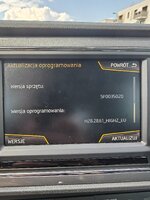
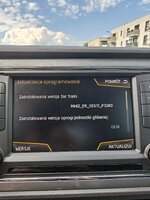
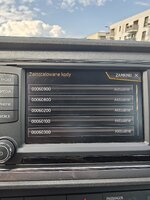
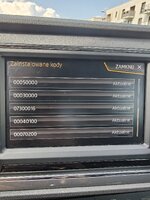
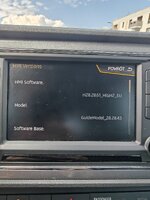
It's a mib2 high unit. The navigation FEC 073... doesn't finish with ee so its never had the AIO on it. Those screens will tell you the actual release. Previous experience of people is that you can just do the upgrade unless mib2 standard they aren't fussy about which which release it's on. For the very latest maps you need the Skoda navigation FeC in there as well as. Thats the mib2 high toolbox and some fumbling to Edit it in. The AIO has release code 1447 since it was built on that. I think you are on 0674 from your screens. The "experts" don't hang about here these days on this. But from experience on the thread its possible to do the big jumps. Make sure your your battery is good, put a charger on it or keep the engine running. It can appears that the unit has hung at the end of the process but it's how it exits.
Thank YouIt's a mib2 high unit. The navigation FEC 073... doesn't finish with ee so its never had the AIO on it. Those screens will tell you the actual release. Previous experience of people is that you can just do the upgrade unless mib2 standard they aren't fussy about which which release it's on. For the very latest maps you need the Skoda navigation FeC in there as well as. Thats the mib2 high toolbox and some fumbling to Edit it in. The AIO has release code 1447 since it was built on that. I think you are on 0674 from your screens. The "experts" don't hang about here these days on this. But from experience on the thread its possible to do the big jumps. Make sure your your battery is good, put a charger on it or keep the engine running. It can appears that the unit has hung at the end of the process but it's how it exits.

Maybe its better idea first install this firmware
MHI2_ER_SEG11_P3302_MU0818
And next
MHI2_ER_SEG11_P4709_1_AIO
"AI"told its safe for this instruction
What do You think
You can jump directly to the final release as I understand it unlike the mib2 standard that had "trains". Early material on German websites had you doing the software updates in stages but the people behind the AIO software scrapped that approach. I think it does empty out the memory so you have to reload the maps etc. For that the 450 release wont work unless you add the Skoda life long navigation FeC using the mib2 high toolkit. 430 would work. My unit has the Skoda FeC in helped by the good people here when this issue came up on a previous map release.
The issue with the plain 1447 release rather than AIO was that it was designed for Cupra copper screen being Cupra release so when installed it appeared as a blank screen. You had to match the screen to Cupra before you started off or fumble with VCDS at the end to make it work. The people behind AIO corrected that. I mention that in case you do try to load up the plain 1447.
I don't have 1447 or AIO on mine but one that is about a year back to the final release put on by a retrofitter fitter but then some FeC magic with the mib2 high toolbox to enable all FeCs then added the Skoda navigation FeC in addition which gives you the final at this point 450 map. Like AIO the toolbox gives you those FeCs although until you get on a later release it might not work. There was a preoccupation in some quarters to enable all FeCs. For a diesel the "sport" screens may not be helpful of revs and for a standard 2wd the tilt offroad screen may not be. I got the additional sport screen on my TDI as well as the rest. You get these via the AIO software.
AIO also updates Gracenotes not that I use.
The issue with the plain 1447 release rather than AIO was that it was designed for Cupra copper screen being Cupra release so when installed it appeared as a blank screen. You had to match the screen to Cupra before you started off or fumble with VCDS at the end to make it work. The people behind AIO corrected that. I mention that in case you do try to load up the plain 1447.
I don't have 1447 or AIO on mine but one that is about a year back to the final release put on by a retrofitter fitter but then some FeC magic with the mib2 high toolbox to enable all FeCs then added the Skoda navigation FeC in addition which gives you the final at this point 450 map. Like AIO the toolbox gives you those FeCs although until you get on a later release it might not work. There was a preoccupation in some quarters to enable all FeCs. For a diesel the "sport" screens may not be helpful of revs and for a standard 2wd the tilt offroad screen may not be. I got the additional sport screen on my TDI as well as the rest. You get these via the AIO software.
AIO also updates Gracenotes not that I use.
Thank You for a answers but someone else on telegram group told me AIO version its dangerous "Sometimes AIO is not good, and maybe you can get errors and your unit brick"You can jump directly to the final release as I understand it unlike the mib2 standard that had "trains". Early material on German websites had you doing the software updates in stages but the people behind the AIO software scrapped that approach. I think it does empty out the memory so you have to reload the maps etc. For that the 450 release wont work unless you add the Skoda life long navigation FeC using the mib2 high toolkit. 430 would work. My unit has the Skoda FeC in helped by the good people here when this issue came up on a previous map release.
The issue with the plain 1447 release rather than AIO was that it was designed for Cupra copper screen being Cupra release so when installed it appeared as a blank screen. You had to match the screen to Cupra before you started off or fumble with VCDS at the end to make it work. The people behind AIO corrected that. I mention that in case you do try to load up the plain 1447.
I don't have 1447 or AIO on mine but one that is about a year back to the final release put on by a retrofitter fitter but then some FeC magic with the mib2 high toolbox to enable all FeCs then added the Skoda navigation FeC in addition which gives you the final at this point 450 map. Like AIO the toolbox gives you those FeCs although until you get on a later release it might not work. There was a preoccupation in some quarters to enable all FeCs. For a diesel the "sport" screens may not be helpful of revs and for a standard 2wd the tilt offroad screen may not be. I got the additional sport screen on my TDI as well as the rest. You get these via the AIO software.
AIO also updates Gracenotes not that I use.
and tell me install this
What do You think ? Can i install AIO and safe its for me
Last edited:
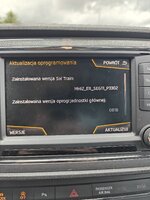
Now i install success this firmwareThank You for a answers but someone else on telegram group told me AIO version its dangerous "Sometimes AIO is not good, and maybe you can get errors and your unit brick"
and tell me install this
What do You think ? Can i install AIO and safe its for meniw
On the screen attache files. And i afraid instal next AIO or original firmware. Someone have this same with i and dont know what choose
Attachments
Similar threads
- Replies
- 12
- Views
- 4K


- Replies
- 0
- Views
- 5K

