• Hey Guest👍👎 We're looking for reviews of your local CUPRA or SEAT Dealership - it's quick and easy to do: Leave a review now
November 2025 - "2026" Mib2 High (Seat Plus) release

It's here thanks to Briskoda eagle eyes. MartiniB.

These are the server links. It's the November 2025 release otherwise called ECE 2026. Release 430 for Europe. 433 for RoW. Note its mib2 high only. Mib1 support in the combined downloads got dropped from 370 on. You need the lifelong FeCs for navigation. See the resource for that if you don't know what they are. Top tab overview.

Cross compatible on:

Skoda Columbus (Mib2H),
Seat Navi Plus (Mib2H),
VW Discover Pro (Mib2H),
Audi MMI Navigation Plus (Mib2H)

Porsche PCM4.0 (Mib2H)


# ECE 14.6 GB

Version: V03.959.823.HL 430 ECE 2026

DevVersion: P430_N60S5MIBH3_EU_NT_Q1.25

VW portal: -

Škoda portal: https://updateportalmaps.blob.core.windows.net/maps/HIGH2_P430_EU_202545.zip

Files inside: 2025.03.31

Downloadable: 2025.11.05

Published: 2025.11.--


# Rest of World 16 GB

Version: V03.959.822.HM 433 ROW 2026

DevVersion: P433_N60S5MIBH3_ROW_NT_Q1.25

VW portal: -

Škoda portal: https://updateportalmaps.blob.core.windows.net/maps/HIGH2_P433_ROW_202545.zip

Files inside: 2024.05.16

Downloadable: 2025.11.05

Published: 2025.11.--

======= coverage =======
# EU
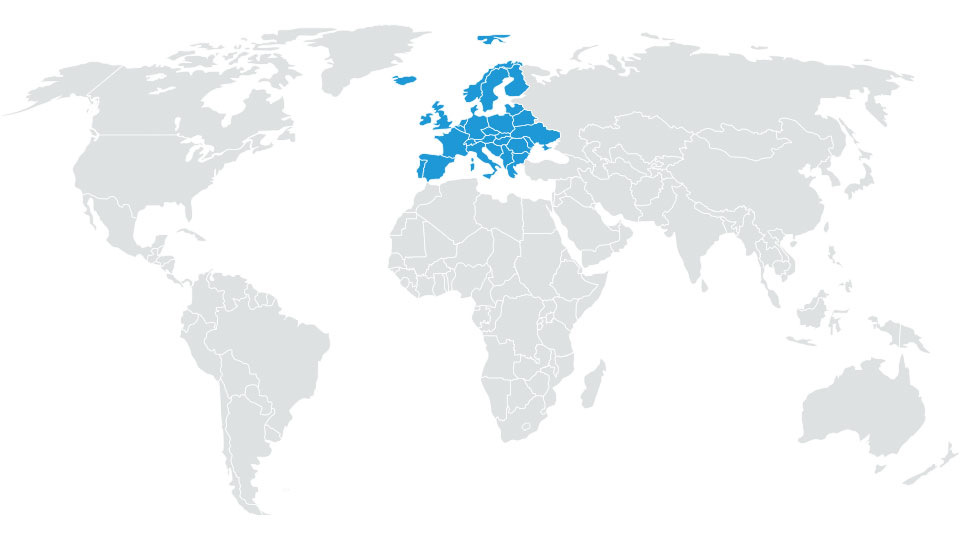
Albania*, Andorra, Austria, Belarus*, Belgium, Bosnia and Herzegovina*, Bulgaria*, Croatia, Cyprus*, Czech Republic, Denmark, Estonia*, Finland, France, Germany, Gibraltar, Great Britain, Greece, Hungary, Iceland, Ireland, Italy, Kosovo*, Latvia*, Liechtenstein, Lithuania*, Luxembourg, Malta, Moldova*, Monaco, Montenegro*, Netherlands, Northern Macedonia*, Norway, Poland, Portugal, Romania*, Russia*, San Marino, Serbia*, Slovakia, Slovenia*, Spain, Sweden, Switzerland, Turkey*, Ukraine*, Vatican City
* partially
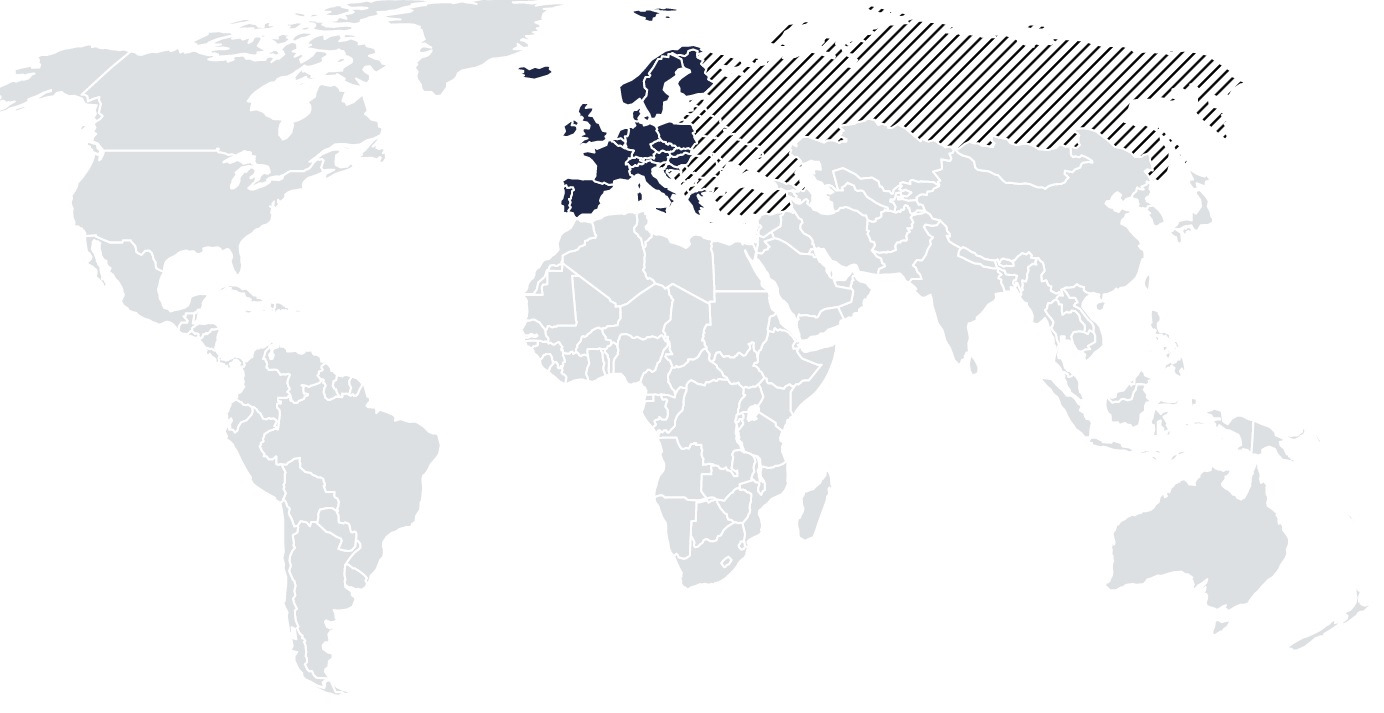
BAlmGE-iKgWSLnDjljWmbPoWFAU-1920.jpg


# ROW
Argentina*, Australia, Bahrain, Botswana*, Brazil*, Brunei*, Chile*, Indonesia*, Israel, Jordan, Kuwait, Lesotho*, Malaysia, Mexico*, Mozambique*, Namibia*, New Zealand, Oman, Philippines*, Qatar, Reunion*, Saudi Arabia, Singapore, South Africa, Swaziland*, Thailand*, Turkey*, United Arab Emirates
* partially
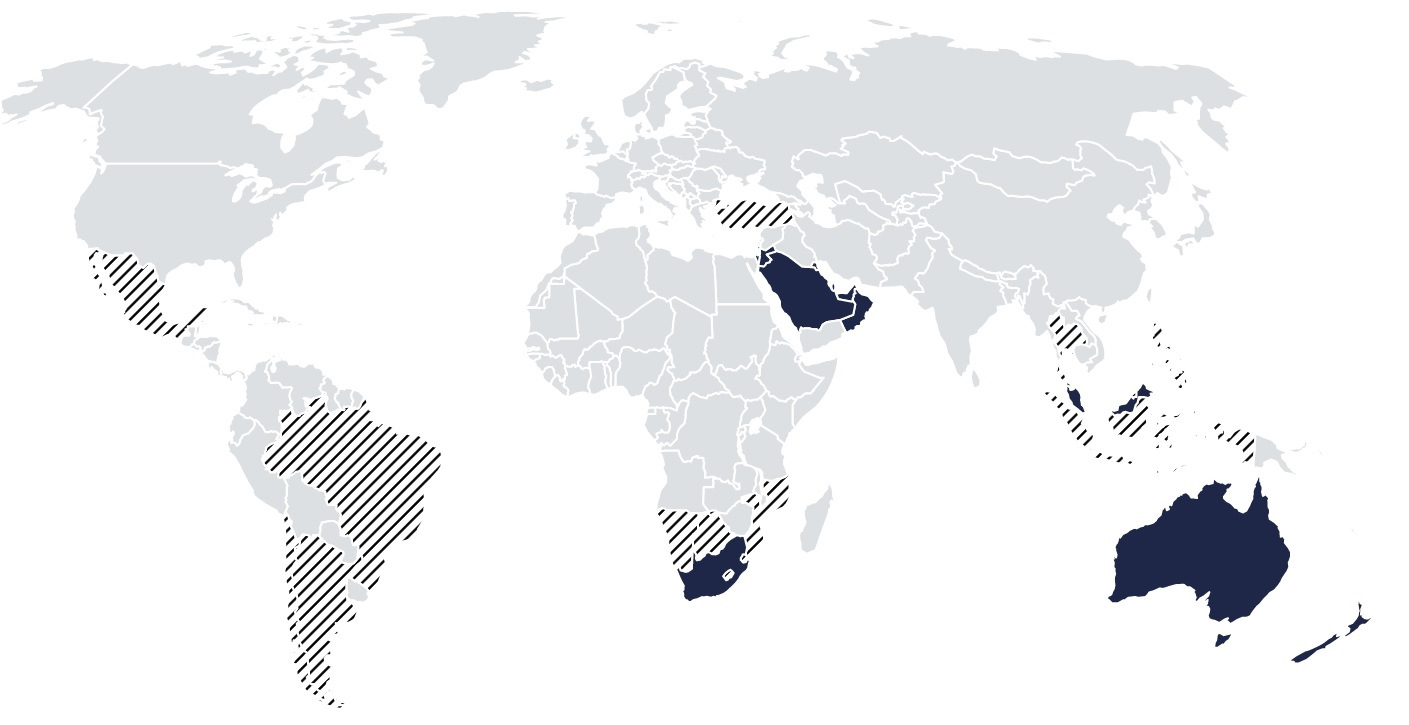
b-C5PeJBQ3Wehv_km57WMX_HF4c-1920.jpg


To load these up on a Seat you need the lifelong navigation FeCs else it won't work. Details in the resource.

You just need to get them unzipped and in the root directory on an SD card (or USB) as normal. Use 7zip it's faster. Metafile in the root, mib1 and mib2 are subdirectories of the root. You do need both. Note the normal Mac instructions for those using a Mac of CleanMyDrive. See resource tabbed under Overview above. TMC Inrix works as per normal with the code change. Latest maps ✔.

Normal success screen:
ECE2026.png
 
November 2025 - "2026" Mib2 High (Seat Plus) release

It's here thanks to Briskoda eagle eyes. MartiniB.

These are the server links. It's the November 2025 release otherwise called ECE 2026. Release 430 for Europe. 433 for RoW. Note its mib2 high only. Mib1 support in the combined downloads got dropped from 370 on. You need the lifelong FeCs for navigation. See the resource for that if you don't know what they are. Top tab overview.

Cross compatible on:

Skoda Columbus (Mib2H),
Seat Navi Plus (Mib2H),
VW Discover Pro (Mib2H),
Audi MMI Navigation Plus (Mib2H)

Porsche PCM4.0 (Mib2H)


# ECE 14.6 GB

Version: V03.959.823.HL 430 ECE 2026

DevVersion: P430_N60S5MIBH3_EU_NT_Q1.25

VW portal: -

Škoda portal: https://updateportalmaps.blob.core.windows.net/maps/HIGH2_P430_EU_202545.zip

Files inside: 2025.03.31

Downloadable: 2025.11.05

Published: 2025.11.--


# Rest of World 16 GB

Version: V03.959.822.HM 433 ROW 2026

DevVersion: P433_N60S5MIBH3_ROW_NT_Q1.25

VW portal: -

Škoda portal: https://updateportalmaps.blob.core.windows.net/maps/HIGH2_P433_ROW_202545.zip

Files inside: 2024.05.16

Downloadable: 2025.11.05

Published: 2025.11.--

======= coverage =======
# EU
Albania*, Andorra, Austria, Belarus*, Belgium, Bosnia and Herzegovina*, Bulgaria*, Croatia, Cyprus*, Czech Republic, Denmark, Estonia*, Finland, France, Germany, Gibraltar, Great Britain, Greece, Hungary, Iceland, Ireland, Italy, Kosovo*, Latvia*, Liechtenstein, Lithuania*, Luxembourg, Malta, Moldova*, Monaco, Montenegro*, Netherlands, Northern Macedonia*, Norway, Poland, Portugal, Romania*, Russia*, San Marino, Serbia*, Slovakia, Slovenia*, Spain, Sweden, Switzerland, Turkey*, Ukraine*, Vatican City
* partially

BAlmGE-iKgWSLnDjljWmbPoWFAU-1920.jpg


# ROW
Argentina*, Australia, Bahrain, Botswana*, Brazil*, Brunei*, Chile*, Indonesia*, Israel, Jordan, Kuwait, Lesotho*, Malaysia, Mexico*, Mozambique*, Namibia*, New Zealand, Oman, Philippines*, Qatar, Reunion*, Saudi Arabia, Singapore, South Africa, Swaziland*, Thailand*, Turkey*, United Arab Emirates
* partially
b-C5PeJBQ3Wehv_km57WMX_HF4c-1920.jpg


To load these up on a Seat you need the lifelong navigation FeCs else it won't work. Details in the resource.

You just need to get them unzipped and in the root directory on an SD card (or USB) as normal. Use 7zip it's faster. Metafile in the root, mib1 and mib2 are subdirectories of the root. You do need both. Note the normal Mac instructions for those using a Mac of CleanMyDrive. See resource tabbed under Overview above. TMC Inrix works as per normal with the code change. Latest maps ✔.

Normal success screen:
View attachment 51409
I meant to thank you for this a while back, (y), don't know what we'll do if you leave the Forum!!
 
  • Like
Reactions: Tell
The updates will probably stop before I change the car :ROFLMAO:. Martinib is bringing them together, they get funneled in his direction if they haven't been found by him. So acts as a focus.

The 430 update works well and the Inrix traffic report code mod for the UK works well (that was thanks to an Audi TT driver which have mib2 highs in them). It faithfully reported the road closures in Milton Keynes whilst travelling in a foreign country 🤣. Quite a bit of new road building and housing developments in England.
 
  • Like
Reactions: Walone
The updates will probably stop before I change the car :ROFLMAO:. Martinib is bringing them together, they get funneled in his direction if they haven't been found by him. So acts as a focus.

The 430 update works well and the Inrix traffic report code mod for the UK works well (that was thanks to an Audi TT driver which have mib2 highs in them). It faithfully reported the road closures in Milton Keynes whilst travelling in a foreign country 🤣. Quite a bit of new road building and housing developments in England.
What's the 'Inrix traffic report code mod for the UK'? Don't recall seeing this mentioned before. :(
 
What's the 'Inrix traffic report code mod for the UK'? Don't recall seeing this mentioned before. :(
This one. Gets TMC working again on the mib2 high by shifting into another traffic group. It takes it's feed from the highway agencies that use the same system to record traffic works and delays.

 
  • Like
Reactions: Walone
This one. Gets TMC working again on the mib2 high by shifting into another traffic group. It takes it's feed from the highway agencies that use the same system to record traffic works and delays.

Last time I checked, think it was the previous map update, I'm sure the 'Traffic' button was working on my MIB2 high, will have to check.
 
Last time I checked, think it was the previous map update, I'm sure the 'Traffic' button was working on my MIB2 high, will have to check.
Will show a cross on TMC when its not working. You might have done the coding change and forgot ;) .

Mib2 standard you cant do that you need old maps and those modules. Mention that to stop anybody trying the code change on that.
 
  • Like
Reactions: Walone
February 2026 mib2 standard - Release 2610 - 2026/2027

Well we are onto the June 2026 release now of the mib2 standard thanks to Skoda eagle eyes. Bit surprised seeing this. Appeared yesterday.

All works least on the ones I have tried.

DONT DONT delete your existing maps without doing the workaround on a Seat, else you will be saying help... more on that below. First take a copy of the SD card then obey the instruction given below.

The files are interchangeable between Seat, VW and Škoda. I have not tested all the links All Europe and EU2 work. Probably all do. Normal form for those familiar.

# ECE AS(A1) 2026/27

VW portal: - -

Škoda portal: https:/updateportalmaps.blob.core.windows.net/maps/STD2_2610_EU_AS_2026.zip

# ECE 1 2026/27

VW portal: - -

Škoda portal: https:/updateportalmaps.blob.core.windows.net/maps/STD2_2610_EU1_2026.zip

# ECE 2 2026/27

VW portal: - -

Škoda portal: https:/updateportalmaps.blob.core.windows.net/maps/STD2_2610_EU2_2026.zip

# ECE 3 2026/27

VW portal: - -

Škoda portal: https:/updateportalmaps.blob.core.windows.net/maps/STD2_2610_EU3_2026.zip

# ECE 4 2026/27

VW portal: - -

Škoda portal: https:/updateportalmaps.blob.core.windows.net/maps/STD2_2610_EU_DL1_2026.zip

# ECE 5 2026/27

VW portal: - -

Škoda portal: https:/updateportalmaps.blob.core.windows.net/maps/STD2_2610_EU_DL2_2026.zip

# ECE 6 2026/27

VW portal: - -

Škoda portal: https:/updateportalmaps.blob.core.windows.net/maps/STD2_2610_EU_DL3_2026.zip

# ECE 7 2026/27

VW portal: - -

Škoda portal: https:/updateportalmaps.blob.core.windows.net/maps/STD2_2610_EU_DL4_2026.zip


Rest of the world ROW and the other fragments are not out yet. Only the above. See the previous post on those:


======= coverage =======
# ECE AS(A1) (All Europe)
Albania, Andorra, Austria, Belarus, Belgium, Bosnia and Herzegovina, Bulgaria, Croatia, Czech Republic, Cyprus, Denmark, Estonia, Finland, France, Faroe Islands, Germany, Gibraltar, Greece, Hungary, Iceland, Ireland, Ireland, Italy, Kosovo, Latvia, Liechtenstein, Lithuania, Luxembourg, Macedonia, Malta, Moldova, Monaco, Montenegro, Netherlands, Norway, Poland, Portugal, Romania, San Marino, Serbia, Slovakia, Slovenia, Spain, Sweden, Switzerland, Ukraine, United Kingdom, Vatican City State
YuSgmVpHyD2FPsHNH29abdM6Olw-960.jpg


# ECE 1
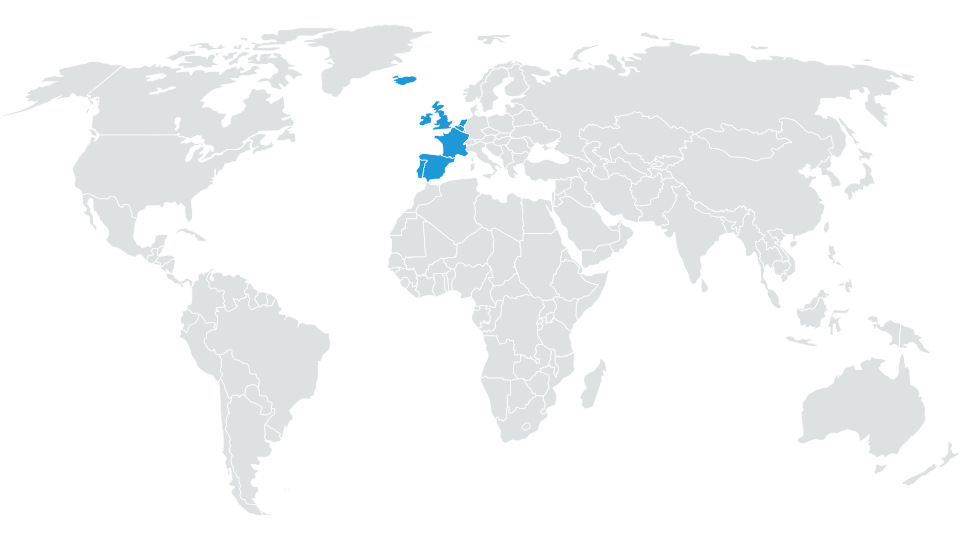
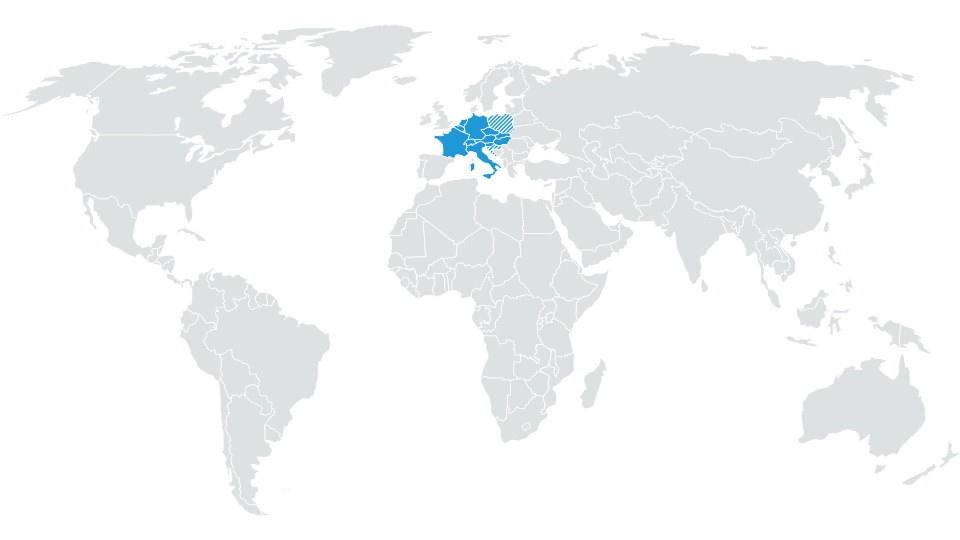
Andorra, Belgium, Faroe Islands, France, Gibraltar, Iceland, Ireland, Ireland, Luxembourg, Monaco, Netherlands, Portugal, Spain, United Kingdom
pv5F6zXqno6eVs-pwKpA7YLI4B4-960.jpg


# ECE 2
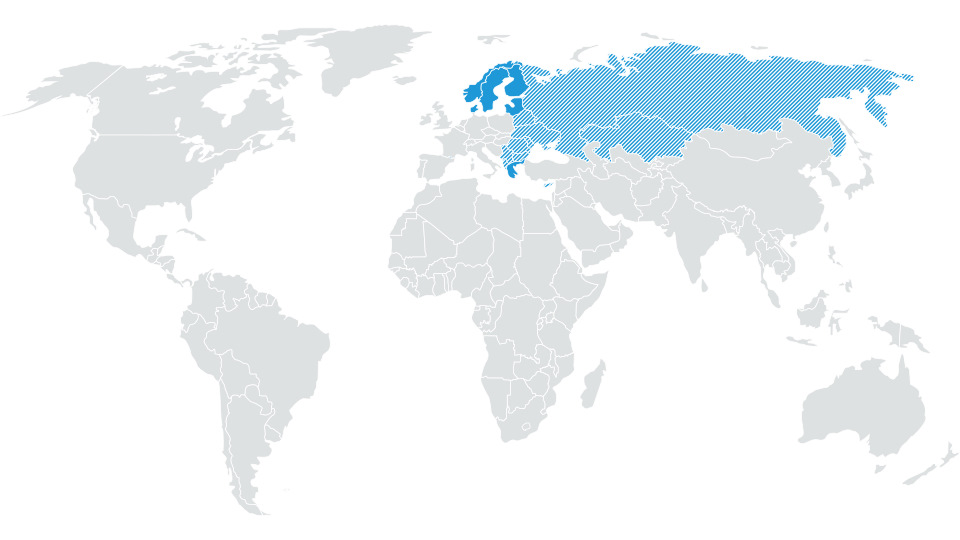
Albania, Belarus, Bosnia and Herzegovina, Bulgaria, Cyprus, Denmark, Estonia, Finland, Greece, Kazakhstan, Kosovo, Latvia, Lithuania, Macedonia, Moldova, Montenegro, Norway, Romania, Russian Federation, Serbia, Sweden, Ukraine
L3UymUfst5cznTN7jAhpxX1lKCQ-960.jpg


# ECE 3
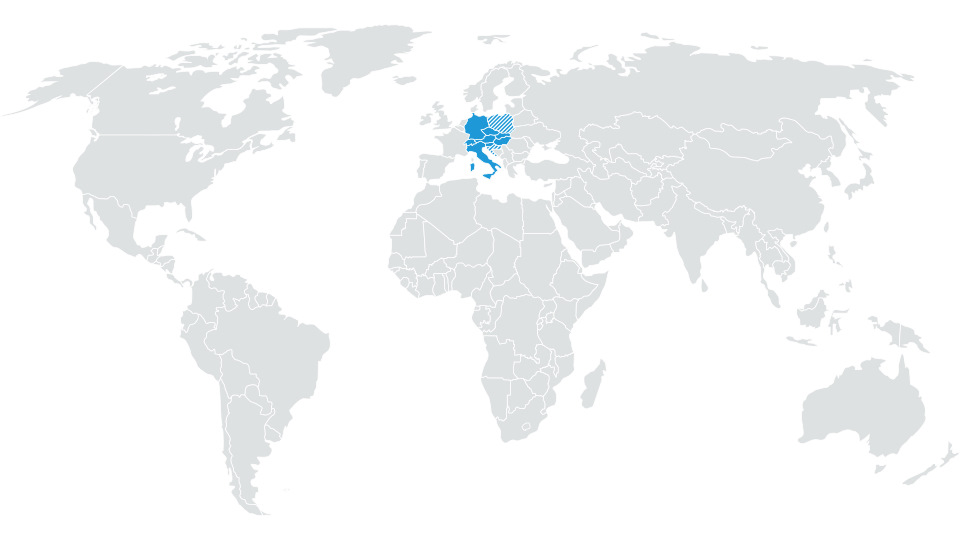
Austria, Croatia, Czech Republic, Germany, Hungary, Italy, Liechtenstein, Malta, Poland, San Marino, Slovakia, Slovenia, Switzerland, Vatican City State
ALKkbqgMnKv9EdJj_RAIq1G44Ok-960.jpg


# ECE 4
Andorra, Austria, Belgium, Croatia, Czech Republic, France, Germany, Hungary, Italy, Liechtenstein, Luxembourg, Malta, Monaco, Netherlands, Poland, San Marino, Slovakia, Slovenia, Switzerland, Vatican City State
ahUOEqem0o83NpiHWGSh1mHHBME-960.jpg


# ECE 5
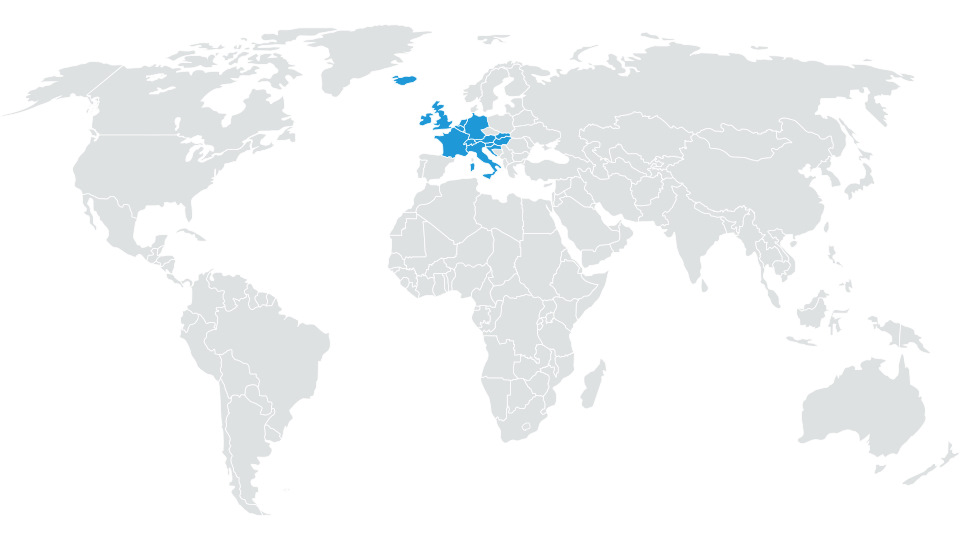
Andorra, Austria, Belgium, Croatia, Czech Republic, Faroe Islands (land-use only), France, Germany, Hungary, Iceland, Ireland, Italy, Liechtenstein, Luxembourg, Malta, Monaco, Netherlands, Poland, San Marino, Slovakia, Slovenia, Switzerland, United Kingdom (incl. Isle of Man), Vatican City State
gV8WvR4Gu5TikwkohJeJeEenq0s-960.jpg


# ECE 6
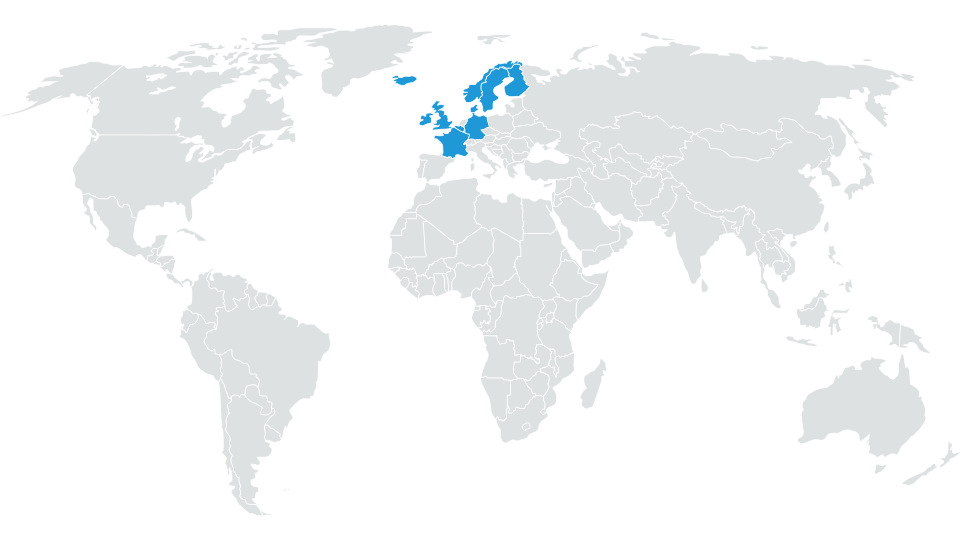
Andorra, Belgium, Denmark, Faroe Islands (land-use only), Finland, France, Germany, Iceland, Ireland, Luxembourg, Monaco, Netherlands, Norway, Sweden, United Kingdom (incl. Isle of Man)
wsWKLsV0LVlOrwitpIaibQEyyG4-960.jpg


# ECE 7
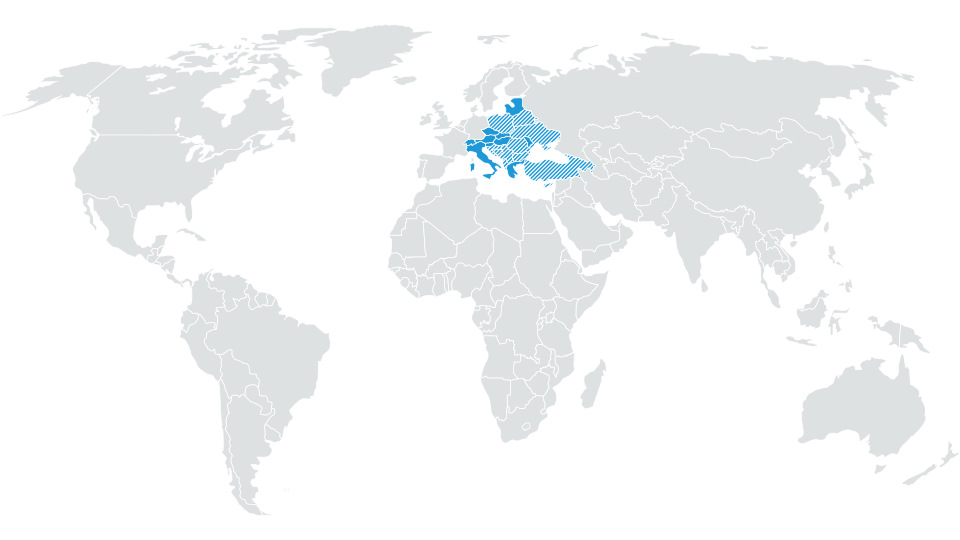
Albania, Austria, Belarus, Bosnia and Herzegovina, Bulgaria, Croatia, Cyprus, Czech Republic, Estonia, Greece, Hungary, Italy, Kosovo, Latvia, Lithuania, Liechtenstein, Macedonia, F.Y.R.O., Malta, Moldova, Montenegro, Poland, Romania, San Marino, Serbia, Slovakia, Slovenia, Switzerland, Turkey, Ukraine, Vatican City State
v04GbGS7sHDighOrC1V_HOHm-4I-960.jpg


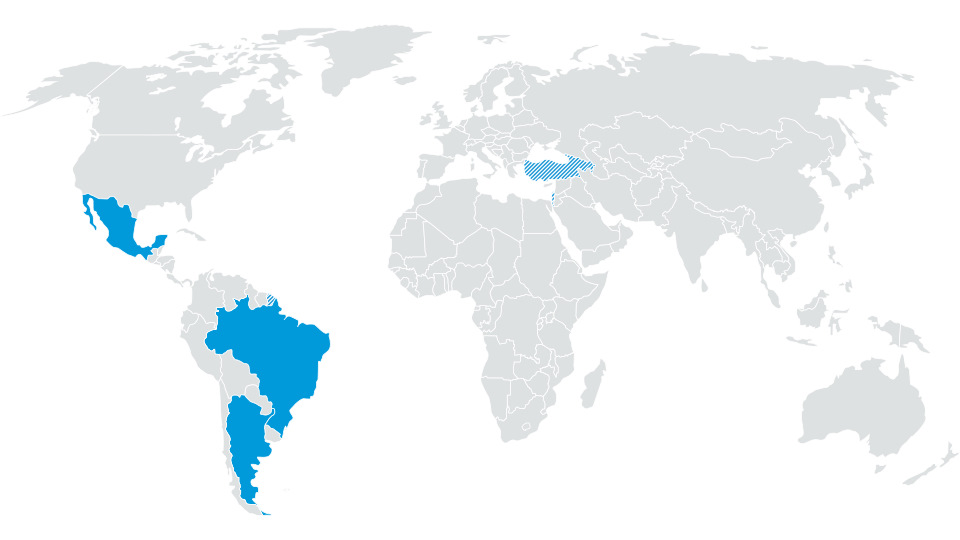
# ROW 1
Israel, Argentina, Brazil, Fr. Guyana *, Guadeloupe *, Martinique *, Mexico, Turkey *
_qdGOCVcaVkDWzRB9n8E9SDQ9jU-960.jpg


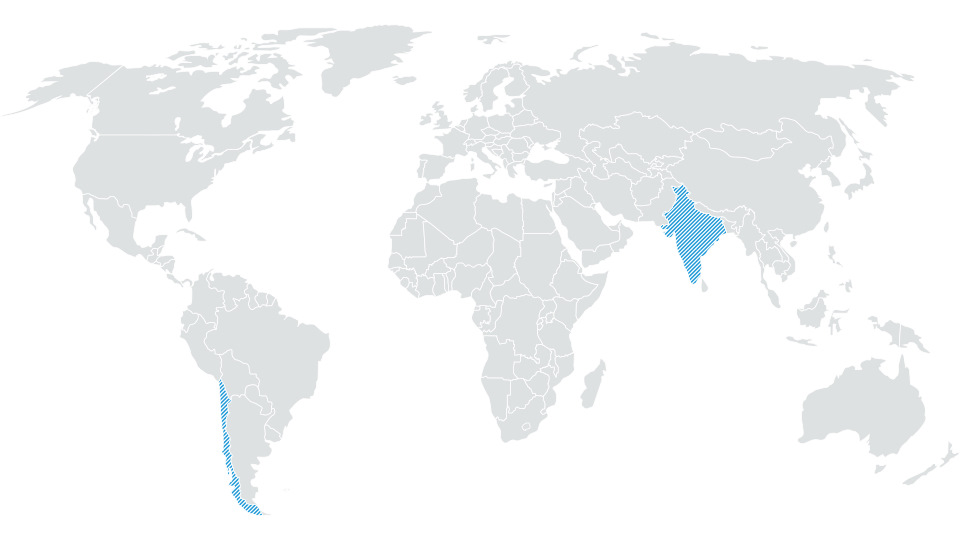
# ROW 2
India *, Chile *
A64OdkuuZAVU1MC1sQb828sgdMU-960.jpg


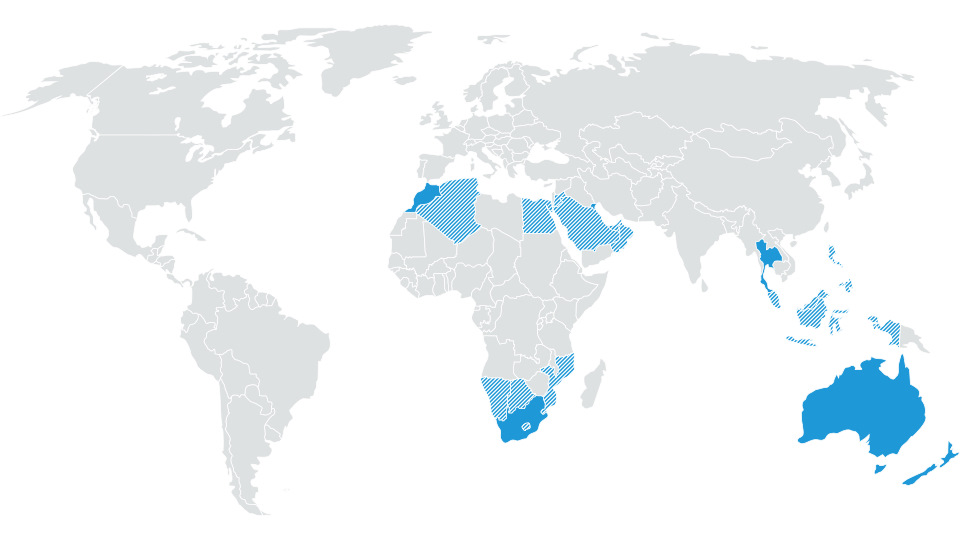
# ROW 3
Australia, New Zealand, Botswana *, Lesotho *, Mozambique *, Namibia *, South Africa, Swaziland *; Reunion *, Brunei, Indonesia *, Malaysia *, Philippines *, Singapore, Thailand, Egypt *, Algeria *, Bahrain *, Jordan *, Qatar *, Kuwait, Morocco, Oman *, Saudi Arbien *, Tunisia, United Arab Emirates *
td_mPMDjnivv5SWwtTltI2Z2YVk-960.jpg


# MRM DL1
Argentina, Brazil, Mexico, French Guiana, Guadeloupe, Martinique

# MRM DL2
Israel, Turkey


----------

The all important workaround is here

Workaround


Using a PC or a MAC ?

PC: 7 Zip is the preferred VW tool, other unzip tool including those built into Windows, can cause difficulties.

7 zip can be obtained from

https://www.7-zip.org/download.html

MAC: VW instructions

"ATTENTION

If the map update is performed using the Apple® OS X operating system you may find that
Discover Media does not recognise the map material or displays it incorrectly. This is due to
a lack of compatibility between the “7 zip” program and the OS-X operating system. In
addition, the OS-X operating system has a tendency to create hidden additional files on
external data media. We therefore recommend that OS X users use the “Keka” unzipping
program. We also recommend using the “CleanMyDrive” program to remove any hidden files."


If a MAC is used CleanMyDrive is run against the SD card after the maps are copied across to the SD card.

Having identified which unzipping tool is required and special Mac SD card cleaning required... free to proceed.

Steps:

  1. Download the latest standard MIB2 maps
  2. on the infotainment go to settings, safely remove, sd1 card
  3. remove sd1 card from glove box slot
  4. long press on the on / off to reboot it a couple of times
  5. insert sd card in to computer
  6. copy and paste all contents to a directory on your computer
  7. Delete the contents of the SD card, (don't forget to push the card lock mechanism to off) (ditto in a MAC) (don't do a reformat of the card)
  8. Copy the new downloaded map version to the SD card (after unzipping it)
  9. Replace /maps/EEC/EEC_WLD/OVERALL.NDS on the SD CARD with the one from the original SD card
  10. eject the sd card (on a MAC run CleanMyDrive on the SD card - then eject), click to lock
  11. Inserted the card into the card 1 slot in glove box whilst infotainment is off
  12. power on and go to navigation
The unit should then boot up into navigation. Note it does take a little longer first time round. If it refuses to boot up, press the volume button forcing a reboot, hold down until the unit reboots. If this fails it will be issues on the overall.nds file / copy issues. Revisit the process. Failing this restore the back up.

You will also need to pick up any POIs that you show on the screen since these will be dropped after a map update. Petrol stations, parking location etc.

Do not format the card in anything other than Fat32. The unit runs QNX so will not correctly see the SD card if it is not in Fat32 / cluster size gets tinkered with in a reformat. The CID is not deleted in a format that is outside of the area that can be addressed but reformatting has been known to corrupt the card.

---

If you do lose the NDF file then it's in the resource of how to sort it out. Read that under lost and stolen section:


It's this file attached is the fix all


---

Success screen. February 2026:
Screenshot_20260209_141758_Gallery[1].jpg
 
Last edited:
Mib2 High 2026/2027 Release - 450 (June comes early this year)

Some good and bad news. Maps are out but you need
Skoda Lifetime Navigation FeC for the Mib2 High (Europe 08300008) to make it work. This can be added to the FeC list as I did previously link or is using AIO firmware you need to add it in there wherever the FeC edit goes in. If you used a retrofitter previously you may have to contact them to modify it if you dont feel capable.

Link when they did this before (2022). I did option 2 in what I described using mib tools:


Mib Tools Github project:


I kept the additional navigation FeC in so it defaults to Seat and Skoda if the Seat navigation FeC isnt found. Thanks to all that invaluable help at the time.

I suspect we might be using the FeC 023000EE at some future point but we'll see. You might just as well use that FeC if starting fresh. Either will work but the 023000EE may give you better insurance if the Skoda one is dropped in the future.

Back to the source map file identified a few days ago by eagle eyes on an Ateca European board and passed to the Briskoda navigation thread. It does load up fine if you have the "long life FeCs" (Skoda or Audi)

Direct link:


At this stage only the EU region is available,

Note it's mib2 high only. Mib1 support in the combined downloads got dropped from 370 on although I think mib1 highs never reached Seats. You need the lifelong FeCs for navigation. See the resource for that if you don't know what they are. Top tab overview and how to identify what your unit although Seat isnt supported with this release with a Seat navigation FeCs. Just a number thou. Different Hex number and it works. The beauty of the mib2 high.

Cross compatible only with a Skoda or Audi life long navigation FeC:

Skoda Columbus (Mib2H),
Seat Navi Plus (Mib2H),
VW Discover Pro (Mib2H),
Audi MMI Navigation Plus (Mib2H)

Porsche PCM4.0 (Mib2H)

Files were finalized in November 2025.

======= coverage =======
# EU
Albania*, Andorra, Austria, Belarus*, Belgium, Bosnia and Herzegovina*, Bulgaria*, Croatia, Cyprus*, Czech Republic, Denmark, Estonia*, Finland, France, Germany, Gibraltar, Great Britain, Greece, Hungary, Iceland, Ireland, Italy, Kosovo*, Latvia*, Liechtenstein, Lithuania*, Luxembourg, Malta, Moldova*, Monaco, Montenegro*, Netherlands, Northern Macedonia*, Norway, Poland, Portugal, Romania*, Russia*, San Marino, Serbia*, Slovakia, Slovenia*, Spain, Sweden, Switzerland, Turkey*, Ukraine*, Vatican City
* partially

BAlmGE-iKgWSLnDjljWmbPoWFAU-1920.jpg


# ROW
Argentina*, Australia, Bahrain, Botswana*, Brazil*, Brunei*, Chile*, Indonesia*, Israel, Jordan, Kuwait, Lesotho*, Malaysia, Mexico*, Mozambique*, Namibia*, New Zealand, Oman, Philippines*, Qatar, Reunion*, Saudi Arabia, Singapore, South Africa, Swaziland*, Thailand*, Turkey*, United Arab Emirates
* partially
b-C5PeJBQ3Wehv_km57WMX_HF4c-1920.jpg


To load these up on a Seat / Cupra you need the lifelong navigation FeCs else it won't work. Details in the resource.

You just need to get them unzipped and in the root directory on an SD card (or USB) as normal. Use 7zip it's faster. Metafile in the root, mib1 and mib2 are subdirectories of the root. You do need both. Note the normal Mac instructions for those using a Mac of CleanMyDrive. See resource tabbed under Overview above. TMC UK Inrix works as per normal with the code change - see the resource instructions for that.

Latest maps ✔.

Normal success screen:
1771004988173.png


I got a suspicion the previous 430 release was similar that missing line above 450 means it's using a different FeC to the brand. It happily does it. Below comes up on the system information screen when using a navigation FeC not of the brand. All works thou.

20260217_133750.jpg
 
Last edited:
Yo leylandvcds do you mind sending me the link for mib1 5F0 maps they dissaperead after trying updating them i didnt know they cannot be updated lol .
 
Yo leylandvcds do you mind sending me the link for mib1 5F0 maps they dissaperead after trying updating them i didnt know they cannot be updated lol .
Moral here always back up the SD card before a map update if its SD based. They can be updated but you need to update the firmware as well for mib1 that's on the thread and you may need to recode the unit after the firmware update - skins. I provided some pointers in the overview tab where it had been done based on what people had done and said. A 16gb mib2 card is useful as well to save hacking the files around to fit the original 8gb card. The success with mib1 is on the firmware update and the mib1 workaround which had alluded people for sometime. I have never had mib1. I'm not sure whether @LeylandVCDS has mib1 but other posters have.
 
Moral here always back up the SD card before a map update if its SD based. They can be updated but you need to update the firmware as well for mib1 that's on the thread and you may need to recode the unit after the firmware update - skins. I provided some pointers in the overview tab where it had been done based on what people had done and said. A 16gb mib2 card is useful as well to save hacking the files around to fit the original 8gb card. The success with mib1 is on the firmware update and the mib1 workaround which had alluded people for sometime. I have never had mib1. I'm not sure whether @LeylandVCDS has mib1 but other posters have.
Sorry, no longer have the MIB1 maps, that was when I had my preFL 64 plate Leon. Now on MIB2 with a FL 19 plate. No longer have the google maps link.
 
  • Like
Reactions: Tell
Sorry, no longer have the MIB1 maps, that was when I had my preFL 64 plate Leon. Now on MIB2 with a FL 19 plate. No longer have the google maps link.
Last time I looked in the resource everything for the mib1 maps I'd linked to peoples posts. If they had removed their content then it wouldn't work. Well we are blessed with the original post (@Daz3d) that got this all going after many years of people not being able to do it.

Map updates I always think are like hot cakes, have them fresh else they might go ... :unsure:.
 
I had to edit the mib2 high post above when it became apparent my customised unit was why it was working :unsure: . Solution is there.

 
February 2026 mib2 standard - Release 2610 - 2026/2027

Well we are onto the June 2026 release now of the mib2 standard thanks to Skoda eagle eyes. Bit surprised seeing this. Appeared yesterday.

All works least on the ones I have tried.

DONT DONT delete your existing maps without doing the workaround on a Seat, else you will be saying help... more on that below. First take a copy of the SD card then obey the instruction given below.

The files are interchangeable between Seat, VW and Škoda. I have not tested all the links All Europe and EU2 work. Probably all do. Normal form for those familiar.

# ECE AS(A1) 2026/27

VW portal: - -

Škoda portal: https:/updateportalmaps.blob.core.windows.net/maps/STD2_2610_EU_AS_2026.zip

# ECE 1 2026/27

VW portal: - -

Škoda portal: https:/updateportalmaps.blob.core.windows.net/maps/STD2_2610_EU1_2026.zip

# ECE 2 2026/27

VW portal: - -

Škoda portal: https:/updateportalmaps.blob.core.windows.net/maps/STD2_2610_EU2_2026.zip

# ECE 3 2026/27

VW portal: - -

Škoda portal: https:/updateportalmaps.blob.core.windows.net/maps/STD2_2610_EU3_2026.zip

# ECE 4 2026/27

VW portal: - -

Škoda portal: https:/updateportalmaps.blob.core.windows.net/maps/STD2_2610_EU_DL1_2026.zip

# ECE 5 2026/27

VW portal: - -

Škoda portal: https:/updateportalmaps.blob.core.windows.net/maps/STD2_2610_EU_DL2_2026.zip

# ECE 6 2026/27

VW portal: - -

Škoda portal: https:/updateportalmaps.blob.core.windows.net/maps/STD2_2610_EU_DL3_2026.zip

# ECE 7 2026/27

VW portal: - -

Škoda portal: https:/updateportalmaps.blob.core.windows.net/maps/STD2_2610_EU_DL4_2026.zip


Rest of the world ROW and the other fragments are not out yet. Only the above. See the previous post on those:


======= coverage =======
# ECE AS(A1) (All Europe)
Albania, Andorra, Austria, Belarus, Belgium, Bosnia and Herzegovina, Bulgaria, Croatia, Czech Republic, Cyprus, Denmark, Estonia, Finland, France, Faroe Islands, Germany, Gibraltar, Greece, Hungary, Iceland, Ireland, Ireland, Italy, Kosovo, Latvia, Liechtenstein, Lithuania, Luxembourg, Macedonia, Malta, Moldova, Monaco, Montenegro, Netherlands, Norway, Poland, Portugal, Romania, San Marino, Serbia, Slovakia, Slovenia, Spain, Sweden, Switzerland, Ukraine, United Kingdom, Vatican City State
YuSgmVpHyD2FPsHNH29abdM6Olw-960.jpg


# ECE 1
Andorra, Belgium, Faroe Islands, France, Gibraltar, Iceland, Ireland, Ireland, Luxembourg, Monaco, Netherlands, Portugal, Spain, United Kingdom
pv5F6zXqno6eVs-pwKpA7YLI4B4-960.jpg


# ECE 2
Albania, Belarus, Bosnia and Herzegovina, Bulgaria, Cyprus, Denmark, Estonia, Finland, Greece, Kazakhstan, Kosovo, Latvia, Lithuania, Macedonia, Moldova, Montenegro, Norway, Romania, Russian Federation, Serbia, Sweden, Ukraine
L3UymUfst5cznTN7jAhpxX1lKCQ-960.jpg


# ECE 3
Austria, Croatia, Czech Republic, Germany, Hungary, Italy, Liechtenstein, Malta, Poland, San Marino, Slovakia, Slovenia, Switzerland, Vatican City State
ALKkbqgMnKv9EdJj_RAIq1G44Ok-960.jpg


# ECE 4
Andorra, Austria, Belgium, Croatia, Czech Republic, France, Germany, Hungary, Italy, Liechtenstein, Luxembourg, Malta, Monaco, Netherlands, Poland, San Marino, Slovakia, Slovenia, Switzerland, Vatican City State
ahUOEqem0o83NpiHWGSh1mHHBME-960.jpg


# ECE 5
Andorra, Austria, Belgium, Croatia, Czech Republic, Faroe Islands (land-use only), France, Germany, Hungary, Iceland, Ireland, Italy, Liechtenstein, Luxembourg, Malta, Monaco, Netherlands, Poland, San Marino, Slovakia, Slovenia, Switzerland, United Kingdom (incl. Isle of Man), Vatican City State
gV8WvR4Gu5TikwkohJeJeEenq0s-960.jpg


# ECE 6
Andorra, Belgium, Denmark, Faroe Islands (land-use only), Finland, France, Germany, Iceland, Ireland, Luxembourg, Monaco, Netherlands, Norway, Sweden, United Kingdom (incl. Isle of Man)
wsWKLsV0LVlOrwitpIaibQEyyG4-960.jpg


# ECE 7
Albania, Austria, Belarus, Bosnia and Herzegovina, Bulgaria, Croatia, Cyprus, Czech Republic, Estonia, Greece, Hungary, Italy, Kosovo, Latvia, Lithuania, Liechtenstein, Macedonia, F.Y.R.O., Malta, Moldova, Montenegro, Poland, Romania, San Marino, Serbia, Slovakia, Slovenia, Switzerland, Turkey, Ukraine, Vatican City State
v04GbGS7sHDighOrC1V_HOHm-4I-960.jpg


# ROW 1
Israel, Argentina, Brazil, Fr. Guyana *, Guadeloupe *, Martinique *, Mexico, Turkey *
_qdGOCVcaVkDWzRB9n8E9SDQ9jU-960.jpg


# ROW 2
India *, Chile *
A64OdkuuZAVU1MC1sQb828sgdMU-960.jpg


# ROW 3
Australia, New Zealand, Botswana *, Lesotho *, Mozambique *, Namibia *, South Africa, Swaziland *; Reunion *, Brunei, Indonesia *, Malaysia *, Philippines *, Singapore, Thailand, Egypt *, Algeria *, Bahrain *, Jordan *, Qatar *, Kuwait, Morocco, Oman *, Saudi Arbien *, Tunisia, United Arab Emirates *
td_mPMDjnivv5SWwtTltI2Z2YVk-960.jpg


# MRM DL1
Argentina, Brazil, Mexico, French Guiana, Guadeloupe, Martinique

# MRM DL2
Israel, Turkey


----------

The all important workaround is here

Workaround


Using a PC or a MAC ?

PC: 7 Zip is the preferred VW tool, other unzip tool including those built into Windows, can cause difficulties.

7 zip can be obtained from

https://www.7-zip.org/download.html

MAC: VW instructions

"ATTENTION

If the map update is performed using the Apple® OS X operating system you may find that
Discover Media does not recognise the map material or displays it incorrectly. This is due to
a lack of compatibility between the “7 zip” program and the OS-X operating system. In
addition, the OS-X operating system has a tendency to create hidden additional files on
external data media. We therefore recommend that OS X users use the “Keka” unzipping
program. We also recommend using the “CleanMyDrive” program to remove any hidden files."


If a MAC is used CleanMyDrive is run against the SD card after the maps are copied across to the SD card.

Having identified which unzipping tool is required and special Mac SD card cleaning required... free to proceed.

Steps:

  1. Download the latest standard MIB2 maps
  2. on the infotainment go to settings, safely remove, sd1 card
  3. remove sd1 card from glove box slot
  4. long press on the on / off to reboot it a couple of times
  5. insert sd card in to computer
  6. copy and paste all contents to a directory on your computer
  7. Delete the contents of the SD card, (don't forget to push the card lock mechanism to off) (ditto in a MAC) (don't do a reformat of the card)
  8. Copy the new downloaded map version to the SD card (after unzipping it)
  9. Replace /maps/EEC/EEC_WLD/OVERALL.NDS on the SD CARD with the one from the original SD card
  10. eject the sd card (on a MAC run CleanMyDrive on the SD card - then eject), click to lock
  11. Inserted the card into the card 1 slot in glove box whilst infotainment is off
  12. power on and go to navigation
The unit should then boot up into navigation. Note it does take a little longer first time round. If it refuses to boot up, press the volume button forcing a reboot, hold down until the unit reboots. If this fails it will be issues on the overall.nds file / copy issues. Revisit the process. Failing this restore the back up.

You will also need to pick up any POIs that you show on the screen since these will be dropped after a map update. Petrol stations, parking location etc.

Do not format the card in anything other than Fat32. The unit runs QNX so will not correctly see the SD card if it is not in Fat32 / cluster size gets tinkered with in a reformat. The CID is not deleted in a format that is outside of the area that can be addressed but reformatting has been known to corrupt the card.

---

If you do lose the NDF file then it's in the resource of how to sort it out. Read that under lost and stolen section:


It's this file attached is the fix all


---

Success screen. February 2026:
View attachment 52809
Successfully loaded EC1 maps to 2020 Leon. Thanks
 
  • Like
Reactions: Tell
Well thanks for this guide, I know have 2023 maps :)(y)

I updated from 0425 to 0480 with no issues, it came up with some note about a code. I just left it and it rebooted fine.

I downloaded the P106_N60S3MIBS2_EU_NT (8V0060866S).7z from https://mibsolution.one/#/1. Extracted it to my HDD. I then removed a few files in the markets/eu/map/MapRegions folder. Ukraine and turkey stuff if I remember correctly, this made the files fit on the original card. Modified the DbInfo.txt by copying the original one from my map car and changing the last 2 lines to

ApplicationSoftwareVersionNumber="0106"
SystemName=" ECE 2023 "

from the new map file.

I then copied the contents of the original card to my HDD.

I then formatted the original card to fat32, and copied over the new files, put the card in the car and waited for what seemed like hours. It now works.

Thanks
do u mind sending link of ur maps like google drive or mega,thanks a lot
 
I put a link in the post you quoted. And detailed what needed to be done. but here is a link to the maps if you really need it. https://mibsolution.one/#/1/19/MSTD
For mib1 you probably still need to do the workaround that @Daz3d identified which Europeans had been doing. Link he provided. Covered in the resource here in the limbering up part:


Basically updating maps with mib1 had been illusive. It only worked for about 50% of people circa 2018 so people gave up with it having bought the map file. The foolproof way was to use that covered by @Daz3d when these maps became available and people had a more concerned effort.

To save hacking the files around to fit a 8gb mib1 card you can buy a 16gb mib2 card. Cheap on ebay so you keep a working copy of your existings maps. The CID is interchangeable between mib1 and mib2 standard.

In those posts when people had issues the old roll back to a previous map file release that you didn't have, kick started it. Again Daz3d had provided that which got people out of trouble. That uses a facility in mib1 and mib2 standard that it will always work with older maps but the workaround covered by the European Seat posters then enabled the newer maps.
 
Last edited: